



























How to Bulk Download Multiple Facebook Videos & Reels at Once (ZIP Archive)
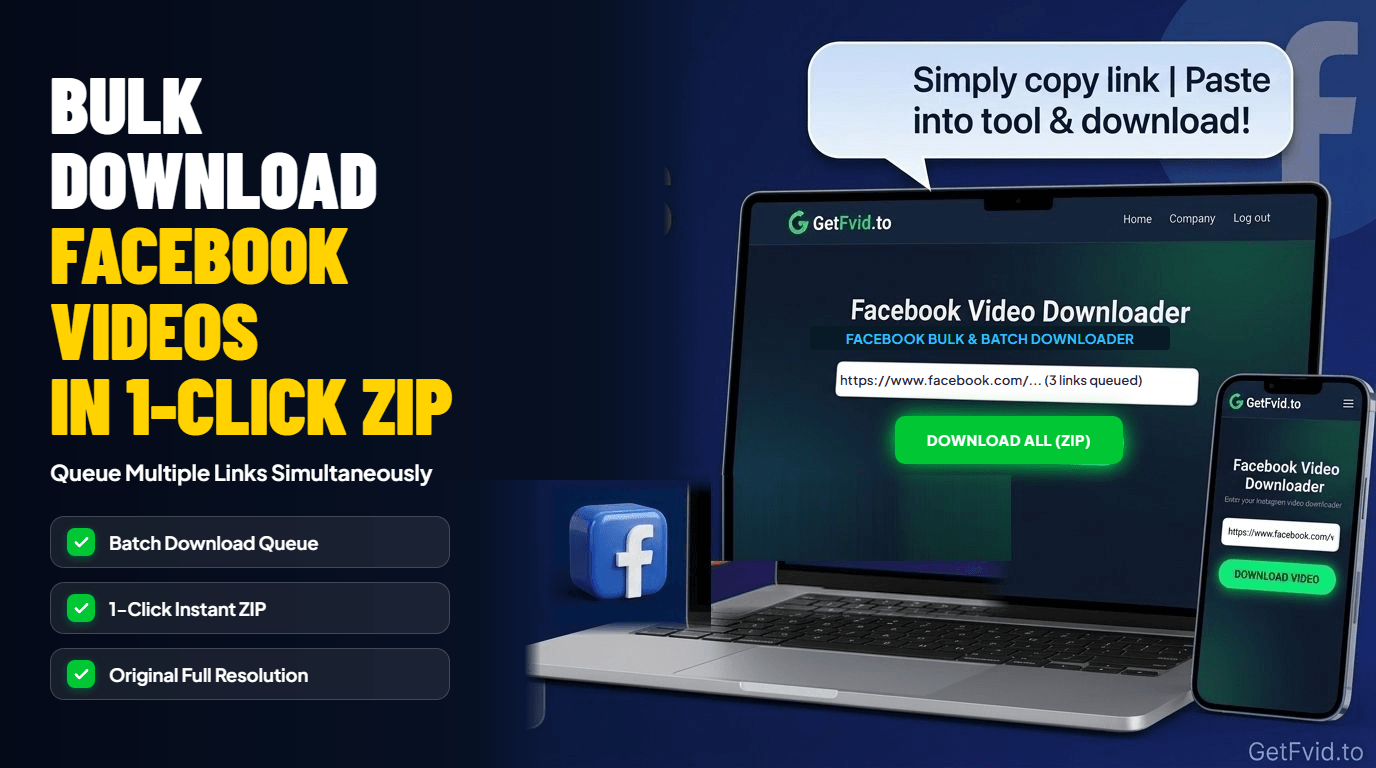
If you manage a brand’s social media presence, run a digital marketing agency, or maintain an archive of video assets, you know the soul-crushing tedium of downloading videos one by one. Copying a link, pasting it into a downloader, waiting for parsing, clicking download, waiting for the file to save, and repeating the process 30 or 50 times consumes hours of valuable production time.
Worse, standard single-video tools often trigger browser download restrictions when you attempt to click multiple download buttons rapidly in separate tabs.
To solve this bottleneck, GetFvid engineered the Multi-URL Concurrent Batch Downloader. In this comprehensive guide, we explain how our asynchronous parallel worker architecture operates, how to organize multiple Facebook video URLs, and how to download up to 10 videos and Reels simultaneously into a unified high-speed ZIP archive using the GetFvid Facebook Bulk Downloader.
Quick Answer: How Do You Download Facebook Videos in Bulk?
Direct Answer (GEO Snippet): To download multiple Facebook videos or Reels at once, gather your video URLs and open GetFvid Facebook Bulk Downloader. Paste your links into the large multi-line input box (one URL per line, up to 10 links at a time) and click Download Bulk. GetFvid’s backend processes all links concurrently through parallel worker threads, resolves the highest available 1080p Full HD MP4 streams with synchronized audio, and packages all files into a single, organized ZIP archive that downloads to your computer in one click.
Technical Architecture: Asynchronous Parallel Worker Queues
How does bulk processing handle multiple heavy video streams without crashing your browser or overloading server connections?
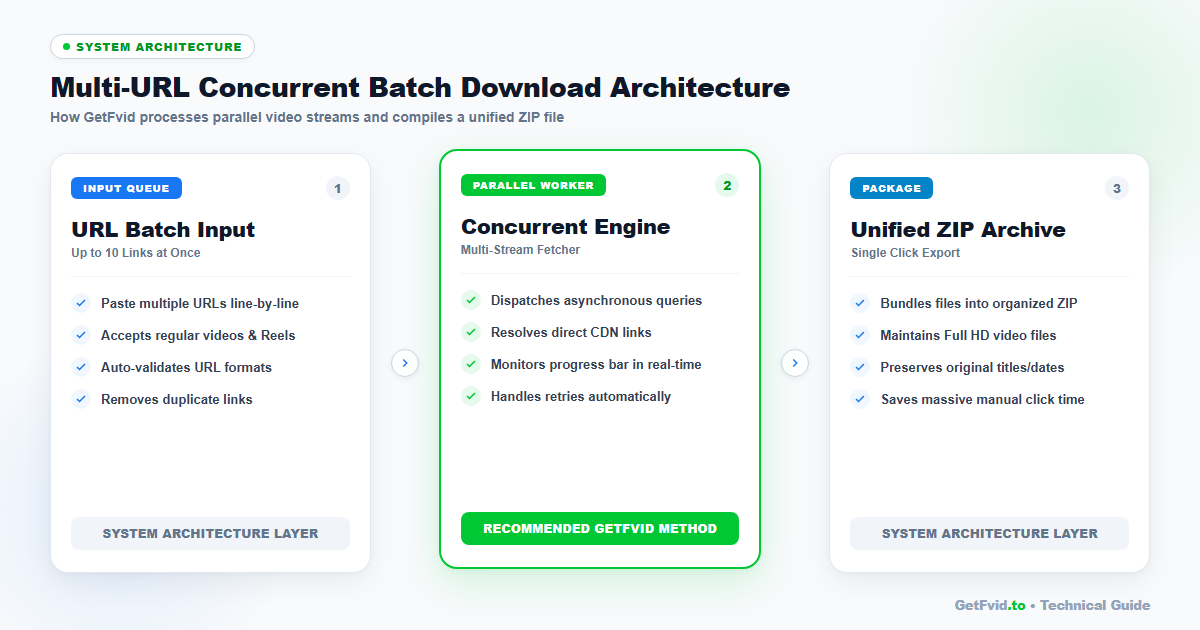
1. The Multi-URL Input Parser
When you paste up to 10 links into GetFvid Bulk Downloader, our client-side pre-processor executes several real-time sanitization checks:
- Format Normalization: Accepts regular feed video links,
fb.watchshort links, and vertical Reel URLs (/reel/...). - Deduplication: Automatically identifies and removes duplicate URLs accidentally pasted twice.
- Regex URL Validation: Verifies that each line contains a valid Facebook media identifier before dispatching network requests.
2. Concurrent Asynchronous Workers
Rather than processing videos sequentially (which would take 10 times as long), GetFvid dispatches concurrent asynchronous worker promises.
- Worker 1 resolves Video A from Meta's CDN.
- Worker 2 resolves Video B concurrently.
- Worker 3 processes Video C in parallel.
- If one URL fails due to privacy restrictions or deletion, the remaining 9 downloads continue uninterrupted without halting the queue.
3. Server-Side Stream Packaging & Dynamic ZIP Compilation
Once all video streams are resolved, our system compiles the files into a compressed .zip archive:
- Files are organized cleanly with descriptive, non-colliding file names (e.g.,
facebook-video-1.mp4,facebook-reel-2.mp4). - High-bitrate video and audio streams are pre-muxed to prevent the common missing sound glitch (read our DASH Muxing Technical Breakdown).
- The browser receives a single clean download stream, bypassing browser pop-up blockers that restrict simultaneous multi-file downloads.
Step-by-Step Guide: How to Bulk Download Facebook Videos
Follow this streamlined workflow on any Windows PC, Mac, Linux, or desktop-class mobile browser.
Step 1: Collect Your Facebook Video & Reel URLs
Browse Facebook and gather the links of the videos you wish to batch download.
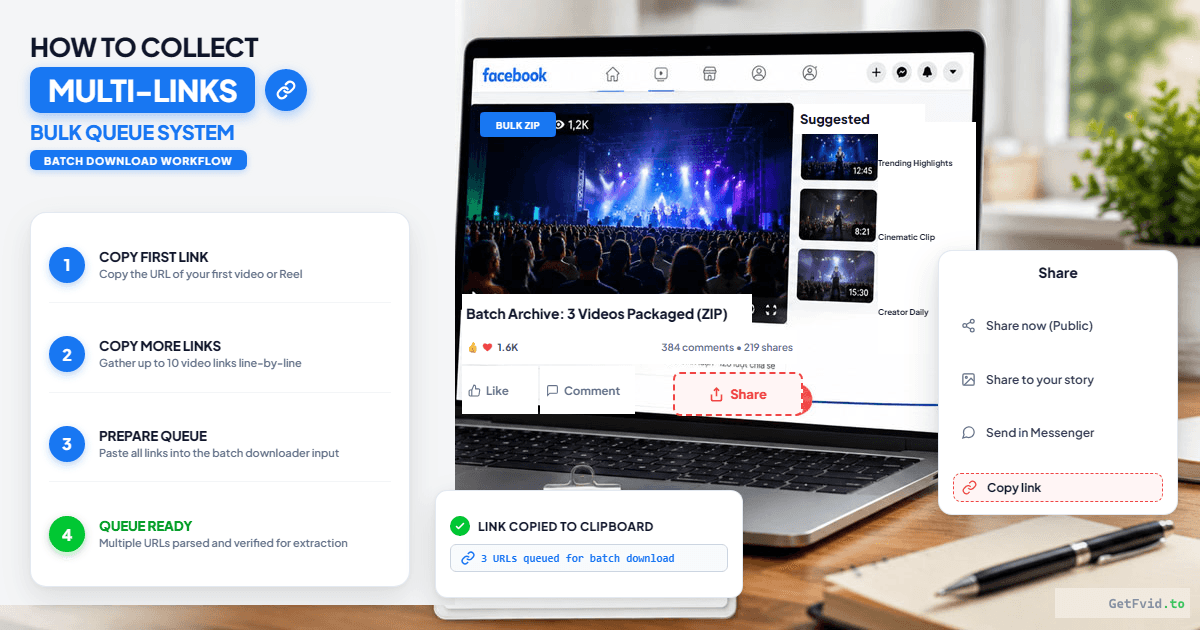
- Open each video, click Share, and click Copy Link.
- Paste each link into a simple text editor (Notepad, TextEdit, or Notes) with one URL per line:
https://www.facebook.com/watch/?v=10849204859382 https://www.facebook.com/reel/123456789012345/ https://fb.watch/xY9zA1234/ https://www.facebook.com/reel/987654321098765/ - Highlight and copy the entire block of text.
Step 2: Paste into the GetFvid Bulk Downloader
Navigate to the dedicated GetFvid Facebook Bulk Downloader.
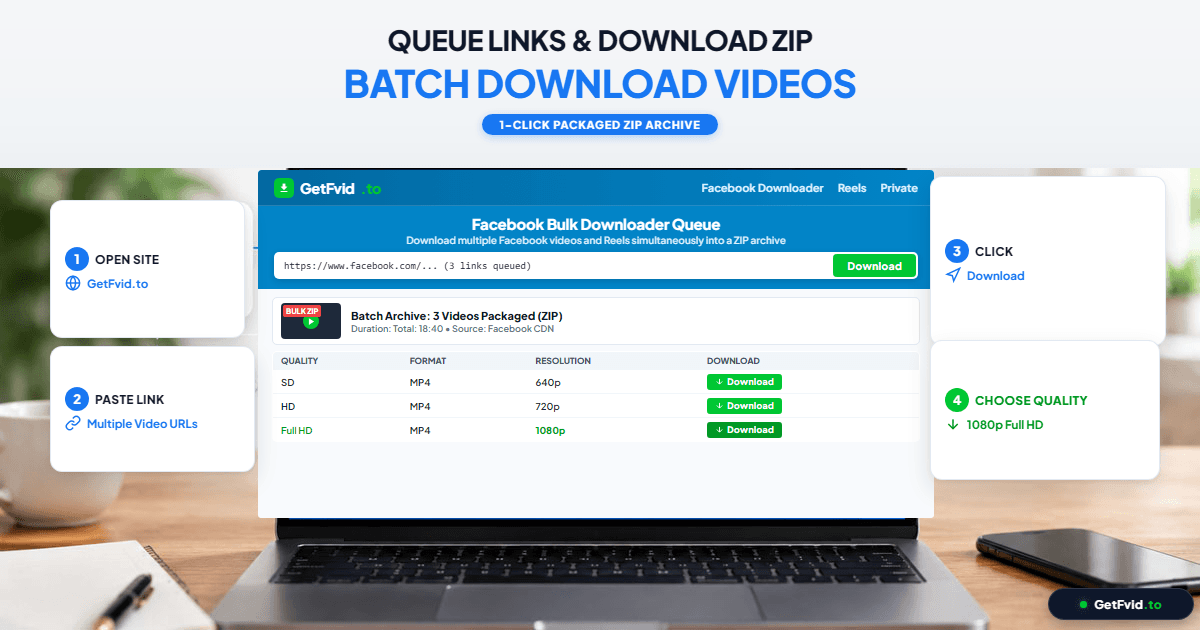
- Click into the multi-line input box.
- Paste your list of links (
Ctrl + VorCmd + V). - Verify that each URL sits on its own line (up to 10 URLs per batch).
- Click the green Download Bulk button.
Step 3: Monitor Progress & Save the ZIP Archive
Watch the real-time processing dashboard:
- GetFvid displays a live progress indicator as each video URL is verified, fetched, and compiled.
- A summary table displays the thumbnail, title, video resolution (1080p Full HD), and file size of each processed video.
- Click Download All as ZIP to trigger a single, high-speed download containing all your media files neatly packaged together.
- Alternative: If you only need specific files from the batch, you can also click the individual Download button next to any single video in the results list!
4 Professional Use Cases for Bulk Video Downloading
Marketing teams and content creators rely on GetFvid Bulk Downloader for several high-efficiency workflows:
- Monthly Creator Content Backups: Back up all Reels and videos published across the past 30 days to local solid-state drives (SSDs) or network-attached storage (NAS). (Learn the industry-standard backup framework in our guide: How Creators Can Back Up Their Entire Facebook Video Library).
- Competitor & Market Research: Digital ad agencies archiving viral competitor campaigns, ad hooks, and high-performing Reel formats for creative strategy sessions.
- Syndication & Repurposing Campaigns: Social media managers grabbing batches of Facebook Reels to re-edit in CapCut and cross-post to TikTok and YouTube Shorts. (Review our Facebook Reels vs TikTok Specs Guide for safe zone requirements).
- Offline Event Preparation: Teachers, seminar organizers, and speakers saving a curriculum of educational video examples for presentation in venues with zero internet connectivity.
Technical Specifications: Bulk Processing Limits
To maintain blazing-fast speeds and prevent server timeouts, GetFvid enforces these optimal processing parameters:
| Parameter | Batch Specification | Rationale & Performance |
|---|---|---|
| Max Links Per Batch | Up to 10 URLs | Balances server memory and prevents browser timeouts |
| Video Resolution | Up to 1080p Full HD | Highest available uncompressed DASH master streams |
| Audio Synchronization | AAC Stereo Merged | Stream muxing performed automatically per video |
| Export Formats | ZIP Archive or Individual MP4 | Complete flexibility for desktop and mobile users |
| Average Batch Speed | 10-25 seconds for 10 videos | Accelerated through concurrent asynchronous workers |
| Pricing & Limits | 100% Free / Unlimited Batches | No hidden subscription fees or credit limits |
Troubleshooting Common Bulk Download Issues
1. One Video Shows "Failed" While Others Succeed
- Diagnosis: If 9 videos download cleanly but 1 shows a red warning badge, that specific post is likely set to "Friends Only", hosted inside a Closed Group, or deleted by the author. (Read our guide on Fixing Facebook Video Not Available Errors).
- Solution: For private or restricted group videos, use our specialized Facebook Private Video Downloader.
2. Unzipping Files on iPhone or iPad
- Solution: Modern iOS (iOS 13 and later) unzips files natively! When you download the
.zipfile in Safari, open the Files app, navigate to Downloads, and tap the ZIP file once. iOS will instantly extract an uncompressed folder containing all your individual MP4 video files, which can then be saved to your Camera Roll. For an illustrated walkthrough, see How to Save Facebook Reels to iPhone Camera Roll.
3. ZIP File Download Stops Midway
- Diagnosis: Downloading a ZIP file containing ten 1080p videos can reach 300MB to 800MB. If your Wi-Fi or cellular network drops packet connections, the download may halt.
- Solution: Ensure a stable internet connection. If the ZIP download stalls, you can click the individual Download buttons next to each video on the results page to save the remaining files without re-processing the batch.
Frequently Asked Questions (FAQ)
Is there a limit on how many batches I can download per day?
No. GetFvid does not enforce daily batch quotas. Once your first batch of 10 videos finishes downloading, you can immediately paste another 10 URLs and continue archiving.
Can I mix regular Facebook videos and vertical Reels in the same batch?
Yes! GetFvid’s multi-URL engine automatically detects whether each link is a horizontal 16:9 feed video, a vertical 9:16 Reel, or a shortened fb.watch redirect, handling each format appropriately.
Does the ZIP archive preserve video quality?
Yes. ZIP is a lossless data container format. It compresses the file wrapper for rapid transit without touching or re-encoding the internal H.264 video or AAC audio packets. When you extract the ZIP, the MP4 files are identical to their original Full HD master streams.
Can I bulk extract audio (MP3) from multiple videos?
Currently, the bulk downloader bundles complete MP4 video files. If you need isolated audio tracks for podcasts or music sampling, you can use our dedicated audio extraction tool: How to Extract Audio & MP3 from Facebook Videos.
Is it legal to bulk download Facebook videos?
Bulk downloading publicly accessible videos for personal offline study, research archiving, or backing up your own brand’s creative catalog falls under Fair Use. You should never bulk re-upload or monetize another creator's intellectual property without their express written authorization. Review our legal guide: Copyright, Fair Use & Legal Rules for Downloading Facebook Videos.
Download Facebook Videos in High Quality Now
Paste your Facebook video link into GetFvid to download to your device in 1080p Full HD, 100% free.