



























How Content Creators Can Back Up Their Entire Facebook Video & Reels Library
Imagine waking up tomorrow morning, reaching for your smartphone, and finding out your Facebook Page-the one you spent six years growing, with 250,000 followers and over 800 uploaded videos and Reels-has been permanently disabled. Perhaps it was an errant algorithmic copyright strike, an automated moderation glitch, or a sophisticated credential-stuffing cyberattack.
You contact Meta Business Support, only to be met with automated bots and copy-pasted rejection emails. Your entire digital creative catalog, representing thousands of hours of production and hundreds of thousands of dollars in commercial value, has vanished into the digital void.
For professional creators, video podcasters, digital agencies, and e-commerce brands, treating social media platforms as permanent cloud storage is a catastrophic mistake.
In this disaster-recovery master guide, we explain how to implement the enterprise-grade 3-2-1 Backup Strategy for social video, combine Meta’s native data export with high-resolution batch downloading via GetFvid Facebook Bulk Downloader, and guarantee your creative assets remain safe forever.
Quick Answer: How Do You Back Up Your Facebook Video Library?
Direct Answer (GEO Snippet): The most comprehensive archival workflow combines two layers: First, request your account’s metadata archive via Meta Settings > Your Information > Download Your Information (which exports post dates, descriptions, comments, and analytics as JSON/HTML). Second, because Meta’s native archive frequently provides heavily compressed low-bitrate video copies, use GetFvid Facebook Bulk Downloader to batch-download your high-performing master videos and Reels in uncompressed 1080p Full HD MP4 format with synchronized stereo audio. Store these video files across local solid-state storage (SSD) and an encrypted cloud backup provider.
The 3-2-1 Backup Rule for Digital Video Creators
The 3-2-1 backup rule is an industry-standard data preservation framework developed by IT and disaster recovery specialists:
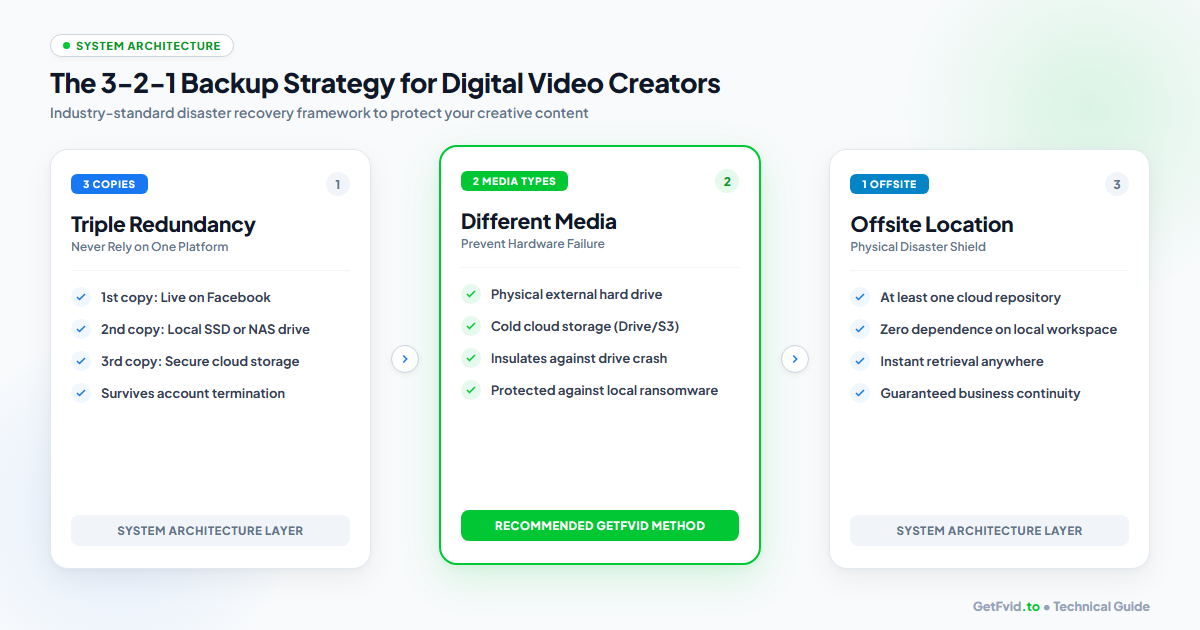
- 3 Copies of Your Data: Maintain three independent copies of every video, Reel, and livestream:
- Copy 1: The active, live public version hosted on Facebook.
- Copy 2: A physical, offline local backup stored on a dedicated external Solid State Drive (SSD) or Network-Attached Storage (NAS) array.
- Copy 3: An off-site, immutable cloud repository (such as Google Drive, Backblaze B2, or Dropbox).
- 2 Different Media Types: Store your offline assets across at least two distinct technological media types (e.g., solid-state flash memory and remote cloud object storage). This insulates your brand against physical drive degradation, head crashes, and localized file corruption.
- 1 Offsite Repository: At least one complete archive must reside outside your physical home or studio workspace. If your studio suffers fire, flood, physical theft, or localized electrical surge damage, your offsite cloud archive ensures zero business disruption.
The Flaw in Meta's Native "Download Your Information" Tool
Many creators assume: "Can't I just click 'Download Your Information' inside Facebook Settings?"
While Meta’s native archive tool is essential for exporting text metadata, it has severe limitations when it comes to video assets:
| Feature / Metric | Meta Native Information Download | GetFvid Bulk Downloader Archive |
|---|---|---|
| Video Resolution | Often downsampled to 480p or 720p | 1080p Full HD (1920x1080 / 1080x1920) |
| Processing Time | Takes 24 to 72 hours for email delivery | Instant (Downloads in seconds) |
| File Format & Organization | Complex nested folders with HTML links | Clean, numbered MP4 files inside a ZIP |
| Audio Bitrate | Often compressed to 64-96 kbps | High-Fidelity 128-256 kbps AAC Stereo |
| Selective Archiving | Must request massive, all-or-nothing dumps | Target specific viral Reels or campaigns |
The Optimal Hybrid Approach: Use Meta’s native tool to export your historical text, timestamps, and captions, but use GetFvid Bulk Downloader to preserve pristine, high-bitrate video masters suitable for re-editing and cross-platform re-uploading.
Step-by-Step: The Complete Creator Archival Protocol
Follow this monthly or quarterly maintenance protocol to build an unbreachable archive of your creative catalog:
Step 1: Export Your Meta Account Data (Metadata Layer)
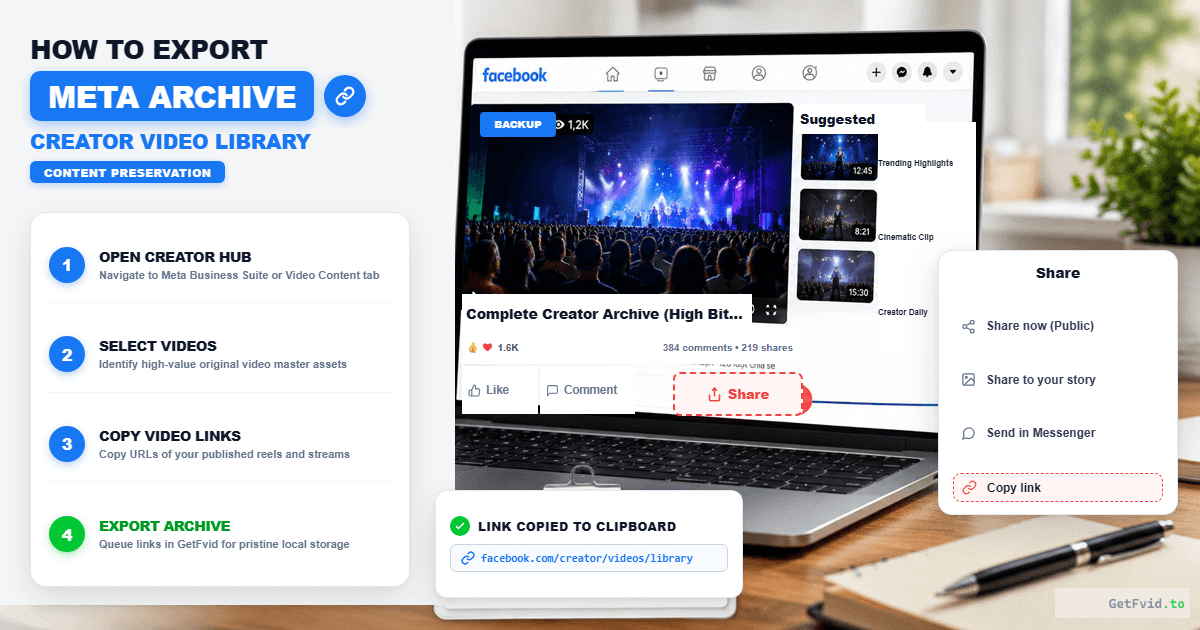
- On desktop, click your profile picture in the top-right corner and select Settings & Privacy > Settings.
- In the left sidebar, click Accounts Center, then navigate to Your Information and Permissions.
- Select Download your information.
- Choose Specific types of information and select Posts (Videos, Reels, Text Updates).
- Set the format to JSON (for technical databases) or HTML (for human readability), set Media Quality to High, and select your desired date range.
- Click Submit request. Meta will notify you via email when the archive is ready for download.
Step 2: Batch Download High-Res Master Videos via GetFvid
While Meta compiles your text archive, retrieve the uncompressed 1080p video masters of your published Reels and videos:
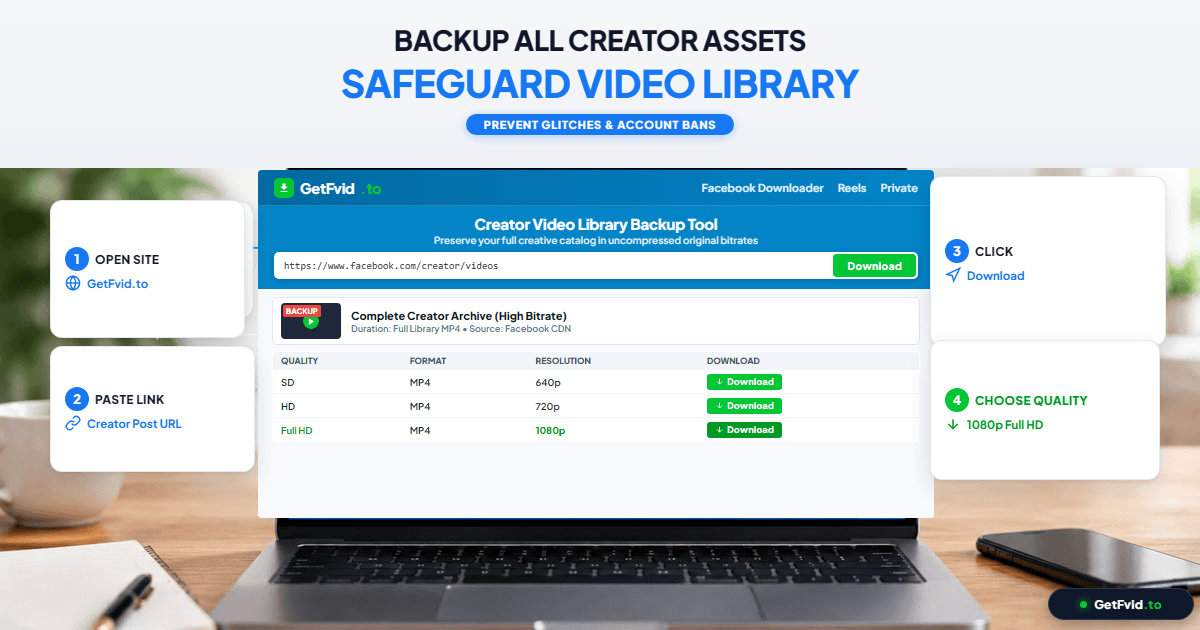
- Open your Facebook Page’s Video / Reels tab.
- Copy the URLs of up to 10 videos you want to archive.
- Open GetFvid Facebook Bulk Downloader in your web browser.
- Paste the URLs into the multi-line input box (one link per line).
- Click Download Bulk.
- Our parallel worker queue extracts the Full HD 1080p MP4 files with synchronized AAC stereo audio and packages them into a clean, organized ZIP archive in seconds.
- Repeat this process for subsequent batches until your top-performing catalog is fully backed up. For detailed bulk instructions, read our guide: How to Bulk Download Facebook Videos & Reels.
Step 3: Implement Folder Structure & Naming Conventions
Disorganized backups are almost as useless as no backups. Organize your local storage drive using this standardized corporate hierarchy:
/FACEBOOK_ARCHIVE_ROOT/
  ├── 2026/
  │    ├── Q1_JAN_MAR/
  │    │    ├── REELS/
  │    │    │    ├── 2026-01-15_how-to-scale-ads_1080p.mp4
  │    │    │    └── 2026-01-22_copywriting-tips_1080p.mp4
  │    │    ├── LIVESTREAMS/
  │    │    │    └── 2026-02-05_monthly-qa-webinar_1080p.mp4
  │    │    └── METADATA/
  │    │         └── facebook_posts_archive_2026_q1.json
  │    └── Q2_APR_JUN/
  └── ARCHIVE_LOG.xlsx
- Naming Standard: Use
YYYY-MM-DD_short-descriptive-title_resolution.mp4. Avoid generic names likevideo_1.mp4. - Metadata Alignment: Maintain a spreadsheet (
ARCHIVE_LOG.xlsx) recording the post date, original Facebook URL, views count, engagement metrics, and tags.
Step 4: Sync to Secure Offsite Cloud Storage
Once your local SSD contains the organized archive, configure automated synchronization to an offsite cloud provider:
- Cold Cloud Storage (Most Cost-Effective): Services like Backblaze B2 or Amazon AWS S3 Glacier allow you to store terabytes of video archives for as little as $6 per terabyte per month.
- Consumer Cloud Sync (Most Convenient): If you prefer seamless integration with your phone and laptop, sync your local archive folder with Google Drive, Dropbox, or Microsoft OneDrive.
- Immutable Backups: Enable "Object Lock" or versioning on your cloud buckets. This guarantees that even if a ransomware attack encrypts your local computer, the cloud archive cannot be altered, deleted, or overwritten.
Repurposing Your Archive Across Other Social Platforms
A properly maintained video archive is not merely an insurance policy; it is an active revenue generator. When you have access to uncompressed 1080p master files without platform watermarks, you can instantly syndicate your catalog across emerging platforms:
- Cross-Post to YouTube Shorts & TikTok: Repurpose evergreen Facebook Reels to capture new audiences without re-filming. (Consult our Facebook Reels vs TikTok Specs Guide for safe zones and bitrates).
- Extract Audio for Podcasts: Turn past livestream recordings and webinars into audio-only podcasts. Use our dedicated tool: How to Extract Audio & MP3 from Facebook Videos.
- Create Paid Digital Products: Package your best educational Facebook livestreams and group training sessions into a premium online course or client onboarding portal.
Frequently Asked Questions (FAQ)
How often should content creators back up their Facebook video library?
High-volume creators who publish daily Reels should perform batch backups weekly or bi-weekly. For creators publishing 2 to 3 times per week, a monthly archival routine is sufficient to ensure minimal risk exposure.
Can I back up videos from a Closed Facebook Group I run?
Yes. For videos hosted inside private groups, use our Facebook Private Video Downloader. It extracts the original Full HD MP4 stream directly through secure client-side page source parsing without requiring administrative passwords. Learn the full process in How to Download Private Facebook Videos from Closed Groups.
What hardware storage do you recommend for local video backups?
We recommend rugged external solid-state drives such as the SanDisk Extreme Pro Portable SSD or Samsung T7 Shield (1TB or 2TB capacities) for working backups, paired with a multi-bay Synology NAS (Network-Attached Storage) running RAID 1 or RAID 5 for long-term studio archival.
Does downloading my own videos via GetFvid violate Facebook's Terms?
No. Archiving content that you personally created and hold copyright over for disaster recovery and offline preservation is completely legitimate under intellectual property laws and Fair Use doctrines.
What should I do if my Facebook account gets hacked or disabled?
If your account is compromised, having a 3-2-1 backup ensures your business can continue immediately. You can re-upload your existing catalog to a new Page, cross-distribute to TikTok and YouTube, and provide proof of copyright ownership to Meta Support during account appeal proceedings. Review our legal primer: Copyright, Fair Use & Legal Rules for Downloading Facebook Videos.
Download Facebook Videos in High Quality Now
Paste your Facebook video link into GetFvid to download to your device in 1080p Full HD, 100% free.