



























How to Download Private Facebook Videos from Closed Groups (No Login Required)
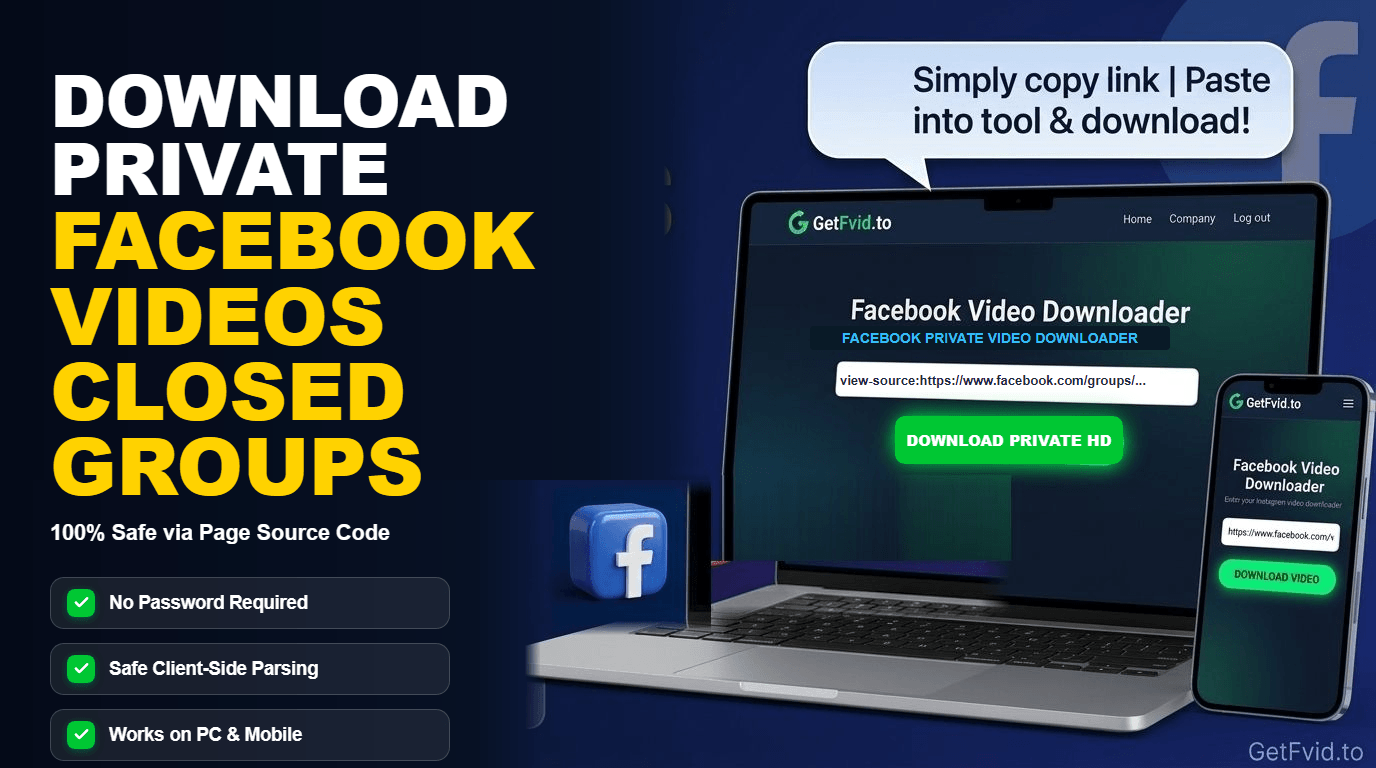
Much of the most valuable video content on Facebook does not live on public Pages or viral feeds. It is shared inside Closed Groups, Secret Groups, and Private Personal Profiles-exclusive mastermind sessions, paid educational coaching workshops, private family milestone recordings, university lecture streams, and internal team presentations.
However, if you copy the URL of a private group video and paste it into a standard online downloader, you will inevitably hit an error wall: "No downloadable media found" or "This content is private".
Why does this happen? Standard download servers do not have access to your personal Facebook account. They cannot see what is inside a closed group. To bypass this, shady tools often prompt you to "Log into Facebook through our website"-a severe cybersecurity risk that can result in stolen credentials, cookie hijacking, and immediate account bans.
In this comprehensive guide, we explain the mechanics of Facebook group privacy and teach you the industry-standard, 100% secure method to download private Facebook videos using client-side Page Source extraction without ever sharing your password or session cookies, using GetFvid Facebook Private Video Downloader.
Quick Answer: How Do You Download Private Facebook Videos?
Direct Answer (GEO Snippet): To download a private Facebook video from a closed group you belong to, log into Facebook on a desktop browser and open the video post. Press
Ctrl + U(on Windows) orCmd + Option + U(on Mac) to view the webpage's raw HTML page source. PressCtrl + AandCtrl + Cto copy the entire source code. Then open GetFvid Facebook Private Video Downloader, paste the source HTML into the designated box, and click Extract Video. GetFvid parses the temporary, authenticated CDN stream directly within your browser’s local memory and downloads the Full HD MP4 file without ever sending your credentials or cookies to external servers.
Why Standard Video Downloaders Fail on Closed Groups
To understand why standard tools fail, you need to understand how Meta enforces Access Control Lists (ACLs):
- Public vs Private Content: When a video is posted publicly, Meta’s Content Delivery Network (CDN) allows any web crawler or public server to request the media chunks.
- The Private Session Barrier: When a video is posted inside a Closed or Secret Group, Meta requires an active HTTP Session Cookie (
c_userandxscookies) that proves the requesting user is an approved member of that specific group. - The Server-Side Dilemma: When you submit a link to a generic downloader website, their external server attempts to fetch the URL. Because their server is not logged into your account and has no membership in your closed group, Facebook rejects the request with an HTTP 403 Forbidden or redirects to the login screen.
- The Dangerous "Solution" (Account Stealing Scrapers): Some unethical websites ask you to enter your Facebook username and password or paste your active session cookies into their form. Doing this hands full administrative control of your Facebook account to unknown third parties.
The Secure Alternative: Client-Side Page Source Extraction
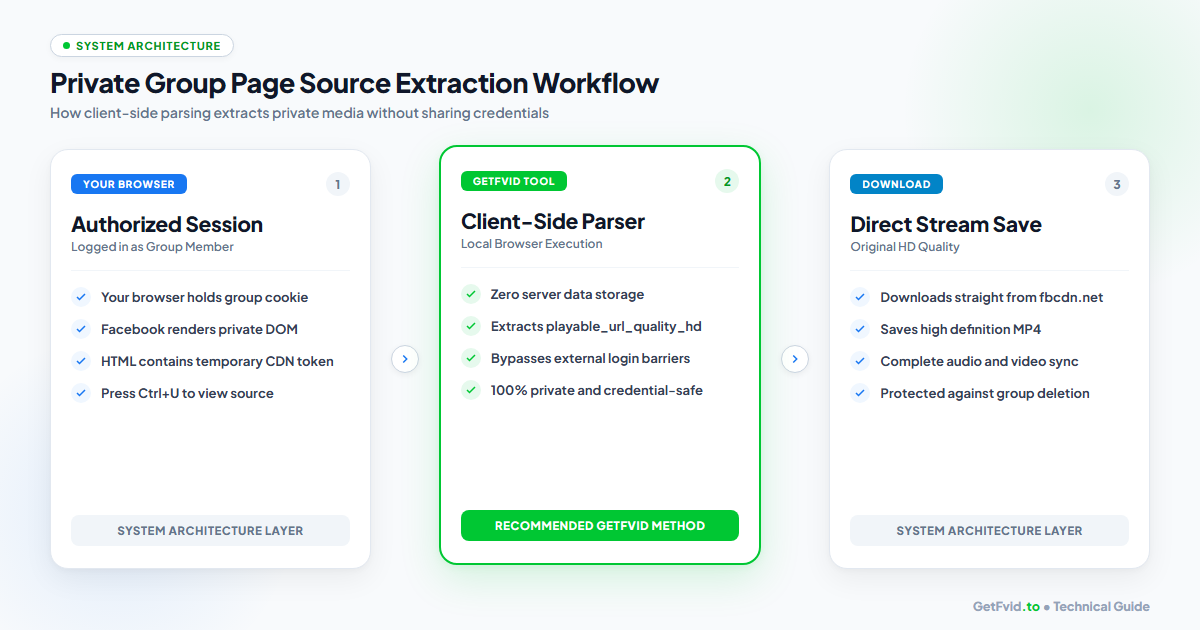
The only secure, zero-risk method to download private group videos is Client-Side Document Object Model (DOM) Extraction:
- You Do the Authenticating: You browse Facebook on your own trusted computer inside your standard browser (Chrome, Firefox, Edge, Safari).
- Meta Delivers the Source: Because you are a legitimate group member, Meta delivers the page HTML containing a temporary, authenticated high-definition CDN token (
playable_url_quality_hd). - GetFvid Runs Locally: GetFvid's Private Downloader executes a specialized parsing script directly in your local browser tab. It scans your pasted HTML text, extracts the temporary video URL, and triggers your browser to download the file directly from
fbcdn.net. - Zero External Data Storage: Your password, email, and session cookies are never touched, requested, or transmitted across the internet.
For a deeper technical breakdown of this architecture, read our companion guide: How Browser Page Source Parsing Works for Private Media.
Step-by-Step Guide: How to Download Closed Group Videos
Follow this simple 4-step workflow on any Windows PC, Mac, or Chromebook:
Step 1: Open the Video in Your Desktop Browser
Log into Facebook on your computer and navigate to the Closed Group or Private Profile containing the video you want to save.
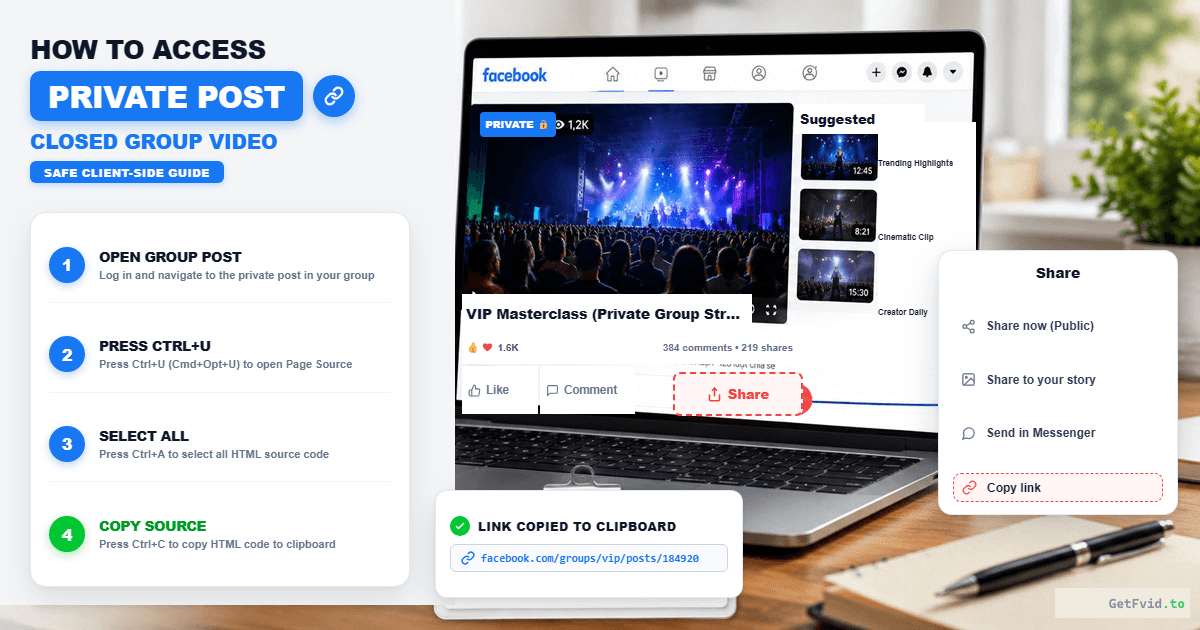
- Open the video post.
- Verify that you can play the video smoothly in your browser. (If you cannot play it, your account lacks permissions or the video was removed; see our guide on Fixing Facebook Video Not Available Errors).
- Click on the timestamp of the post (e.g., "15 mins" or "Yesterday at 2:15 PM") to open the post in its dedicated single-view URL.
Step 2: Open and Copy the Webpage Source Code
Now you need to view the raw HTML source code that Facebook delivered to your browser session:
- On Windows / Linux: Press
Ctrl + Uon your keyboard. - On Mac (Chrome, Edge, Brave): Press
Cmd + Option + U. - On Mac (Safari): Enable Developer Menu (Safari Settings > Advanced > Show features for web developers), then right-click anywhere on the page and select Show Page Source.
A new browser tab will open filled with thousands of lines of raw HTML and JavaScript code.
- Press
Ctrl + A(Windows) orCmd + A(Mac) to select all the source code. - Press
Ctrl + C(Windows) orCmd + C(Mac) to copy the entire code block to your clipboard.
Step 3: Paste Source Code into GetFvid Private Downloader
Open a new tab and navigate to GetFvid Facebook Private Video Downloader.
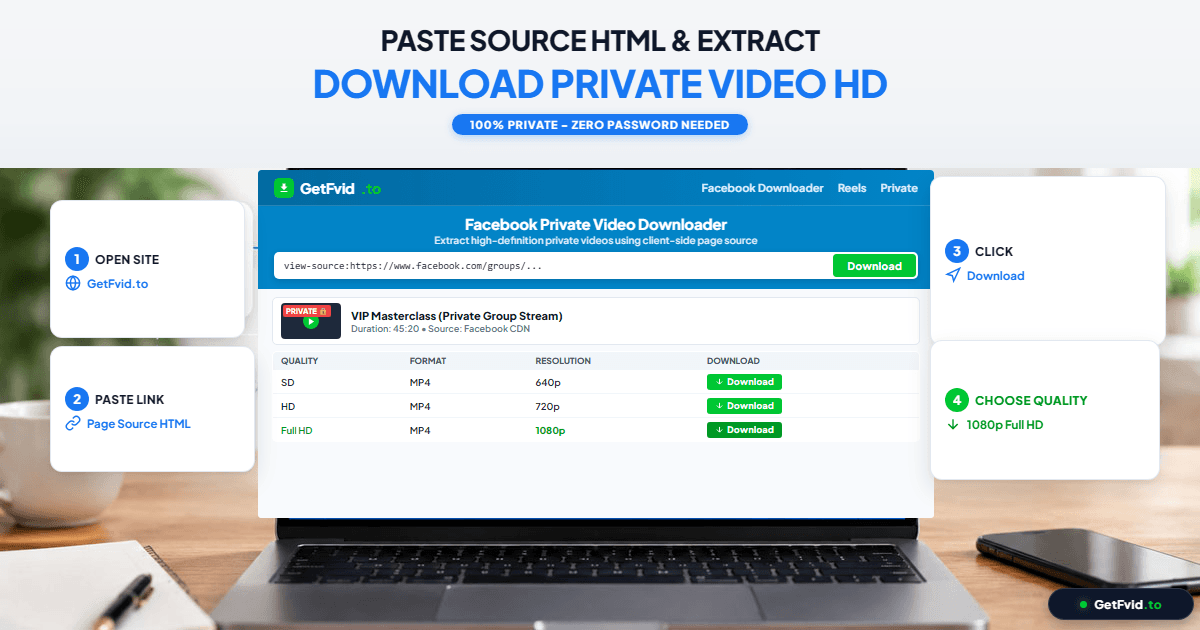
- Locate the large text area labeled "Paste the page source code here...".
- Click inside the box and press
Ctrl + V(Windows) orCmd + V(Mac) to paste the raw HTML source. - Click the green Download button.
Step 4: Choose Quality and Save the Full HD MP4
Within 1 to 3 seconds, GetFvid’s client-side regex engine analyzes the HTML structure, locates the authenticated CDN stream keys, and displays your download options:
- Download 1080p (HD): The full high-definition video master.
- Download 720p (Normal): Standard compressed stream.
- Render MP3: Audio-only track (ideal for podcast recordings or group coaching audio; see How to Extract MP3 Audio from Facebook).
Click the green Download button. The file will save directly to your computer's Downloads directory in standard MP4 format with full audio synchronization!
Technical Analysis: What Secrets Does Page Source Contain?
Curious about what GetFvid is actually finding inside that giant wall of code? If you search the page source (Ctrl + F), you will see how Meta embeds video URLs into the JSON state:
{
  "playable_url": "https://video.xx.fbcdn.net/v/t39.1234-2/...",
  "playable_url_quality_hd": "https://video.xx.fbcdn.net/v/t39.5678-2/...",
  "preferred_quality": "HD",
  "audio_channel_configuration": "stereo"
}
playable_url: Points to the standard definition 480p progressive stream.playable_url_quality_hd: Points to the crisp 1080p Full HD video stream.- The Ephemeral Security Token: Notice the long string of query parameters appended to the CDN URL (
?_nc_cat=...&oh=...&oe=...). These are cryptographic signed tokens generated by Facebook specifically for your active session. They remain valid for approximately 2 to 6 hours, giving you plenty of time to download the file directly before the token expires.
Can You Download Private Videos on iPhone or Android?
While client-side page source extraction is effortless on desktop computers, mobile browsers (iOS Safari and Android Chrome) intentionally disable the Ctrl + U shortcut.
If you do not have access to a desktop computer, here are the two verified mobile workarounds:
Method 1: The view-source: Prefix Trick
- Open the private Facebook post in Chrome or Firefox on your Android or iPhone.
- Tap the address bar, move your cursor to the very beginning of the URL, and type
view-source:in front of the link:view-source:https://m.facebook.com/groups/12345/posts/67890/ - Tap Enter. The browser will render the raw HTML source code.
- Select all text, copy it, and paste it into GetFvid Facebook Private Downloader.
Method 2: Request Desktop Website in Safari / Chrome
- In your mobile browser, tap the page settings icon (
AAin Safari or the three dots in Chrome). - Tap Request Desktop Website.
- Once the desktop layout loads, copy the page source or bookmark our private tool to run the extraction script directly.
4 Crucial Best Practices When Downloading Private Content
1. Respect Privacy & Confidentiality
Videos shared in Closed or Secret Facebook Groups are often restricted for privacy, legal, or proprietary reasons. Always ensure you have the creator's permission before saving or archiving sensitive internal discussions. Review our legal guide: Copyright, Fair Use & Legal Rules for Downloading Facebook Videos.
2. Never Use Third-Party Login Prompts
If any website asks you to enter your Facebook email, password, or 2FA code to download a private video, leave immediately. Legitimate downloaders never require your credentials. Read our cybersecurity audit: Is It Safe to Download Facebook Videos? Web vs Extensions.
3. Handle Audio Sync on Large Files
If you download a 1080p video from a private group and notice audio issues on older media players, read our technical guide on Why Facebook Videos Download Without Sound to ensure proper DASH remuxing.
4. Back Up Group Lectures to External Drives
If you are enrolled in an online course hosted inside a Facebook group, save the downloaded MP4 files to an external hard drive or secure cloud storage using the Creator 3-2-1 Archival Strategy.
Frequently Asked Questions (FAQ)
Can I download private videos from a Facebook group I am not a member of?
No. This is physically and cryptographically impossible. If your Facebook account does not have access to the closed group, Meta’s servers will not deliver the page HTML containing the video token to your browser. You must be an approved member with viewing rights.
Will the group administrator or video author know that I downloaded the video?
No. Page source extraction is completely passive. Your browser simply reads the HTML data that Facebook already transmitted to your screen. No notifications, alerts, or analytics pings are sent to the group admins or the author.
Why is the source code box empty when I press Ctrl+U?
If you press Ctrl + U while a modal popup or full-screen video overlay is open, your browser might display an iframe source instead. Click on the background timeline of the post, or open the post in a dedicated browser tab before pressing Ctrl + U.
Does GetFvid store copies of my private group videos on its servers?
No. GetFvid operates on a strict stateless, zero-knowledge architecture. The HTML regex parsing executes locally inside your browser tab, and the media stream downloads directly from Meta's CDN to your device. We store 0% of your private data.
Can I download private Facebook Reels using this method?
Yes! If a Reel was shared exclusively inside a private group or restricted profile, the exact same page source workflow will extract the clean 1080p MP4 file.
Download Facebook Videos in High Quality Now
Paste your Facebook video link into GetFvid to download to your device in 1080p Full HD, 100% free.