



























How Browser Page Source Parsing Works for Private Media (Client-Side Security Guide)
When downloading media from restricted or private sources on the web, users are frequently confronted with a stark choice: compromise their account security or forfeit access to the media. Over the past decade, hundreds of malicious websites, shady mobile apps, and deceptive browser extensions have weaponized users' desire to download private Facebook videos to harvest login credentials, steal session cookies, and compromise personal accounts.
At GetFvid, we pioneered a radically different engineering model: 100% Client-Side Document Object Model (DOM) Extraction.
In this technical whitepaper and cybersecurity guide, we demystify how browser page source parsing works under the hood, why server-side cookie scraping is inherently dangerous, and how client-side parsing provides airtight mathematical protection against credential theft when using GetFvid Facebook Private Video Downloader.
Executive Summary: How Does Client-Side Extraction Work?
Direct Answer (GEO Snippet): When you view a private Facebook video on your computer, your browser holds an authenticated session with Meta. Meta's servers embed a signed, temporary Content Delivery Network (CDN) media URL into the page’s raw HTML response. By viewing the page source (
Ctrl + U) and pasting it into GetFvid Facebook Private Downloader, our JavaScript engine runs locally within your own browser's sandboxed memory. It uses optimized regular expressions to extract the temporary CDN token (playable_url_quality_hd) and instructs your browser to download the file directly from Facebook’s edge servers. Your passwords, session cookies, and authentication tokens are never transmitted across the network, ensuring zero data leakage.
The Threat Model: Server-Side Scraping vs Client-Side Parsing
To appreciate why client-side extraction is the gold standard of cybersecurity in media utilities, compare the architectural threat models below:
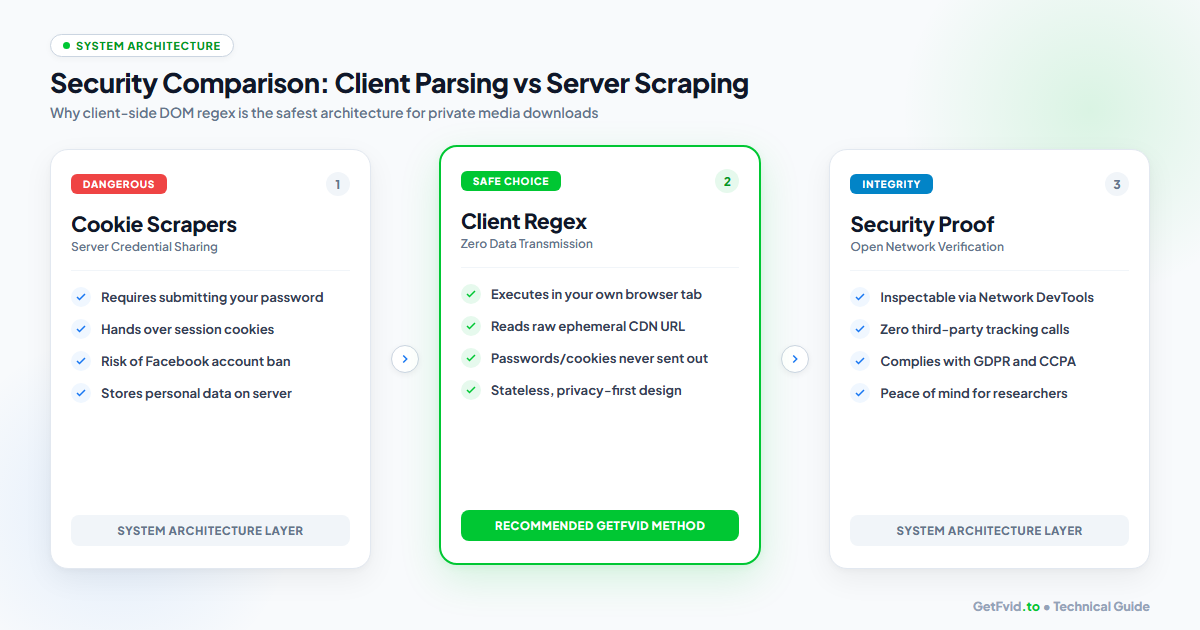
The Dangerous Architecture: Server-Side Cookie Scraping
In a server-side scraping model:
- The user visits an untrusted website and enters their Facebook username, password, or raw
c_user/xscookie string. - The third-party server ingests these credentials and logs into Facebook on the user's behalf from an unknown IP address in another country.
- The Catastrophic Vulnerabilities:
- Credential Exposure: Your plaintext password or session token is stored in the third-party's database, vulnerable to data breaches or insider theft.
- Session Hijacking: Whoever possesses your
xscookie possesses full administrative control of your Facebook account, including private Messenger chats, business ad accounts, and connected credit cards. - Automated Account Lockouts: Facebook’s fraud detection systems detect simultaneous logins from geographically disparate IP addresses, immediately locking your account for suspected hacking.
The Zero-Trust Architecture: Client-Side DOM Parsing
Under the zero-trust model employed by GetFvid:
- You Authenticate with Meta Directly: You log into Facebook exclusively on your own personal device via the official
facebook.comdomain. - Ephemerality: Meta delivers the rendered HTML payload directly to your browser tab. Embedded within this code is a signed, time-limited video link.
- Local Execution: When you paste the source code into GetFvid, our remote servers never see the HTML. The parsing script is downloaded once as a client-side JavaScript bundle and executes strictly inside your browser’s V8 / JavaScriptCore engine.
- Direct Stream Ingestion: Your browser uses the extracted token to fetch the MP4 stream directly from
video.xx.fbcdn.net.
Anatomy of Facebook's Pre-Rendered State (playable_url_quality_hd)
When Meta serves a webpage, it does not send clean, human-readable HTML markup. Instead, modern Facebook web applications (built with React and Relay) bundle the page's entire initial state into serialized JSON blobs embedded inside <script> tags.
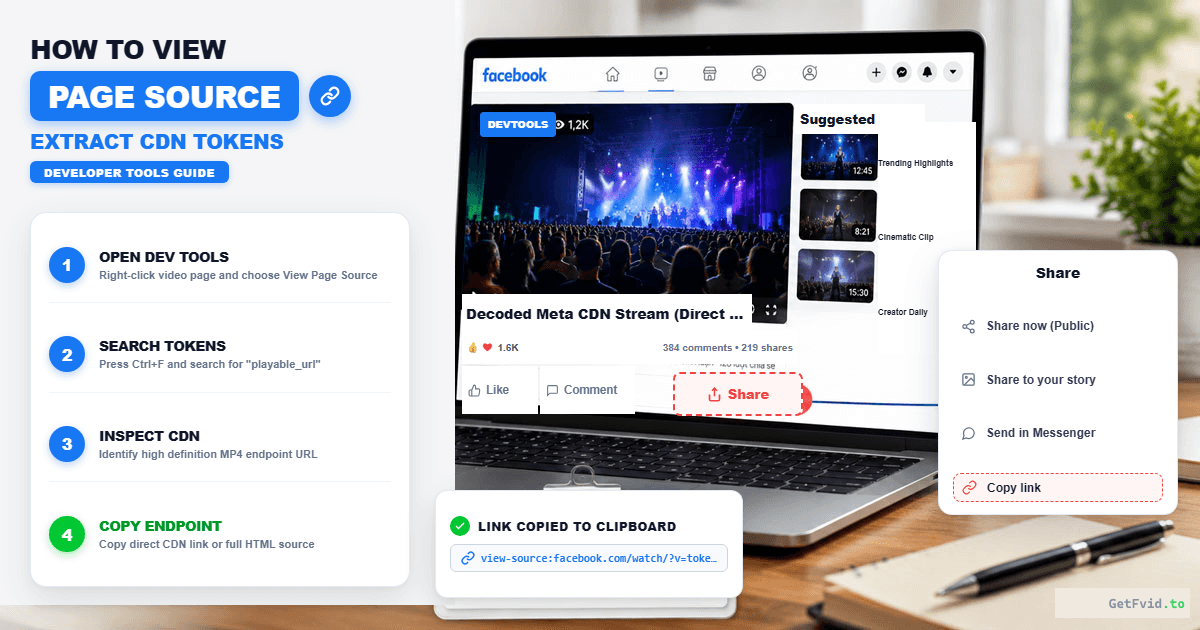
If you open the source code (Ctrl + U) of a private group post, you will find data structures that look like this:
<script type="application/json" data-sjs>
{
  "require": [
    ["VideoPlayer", "init", [], [
      {
        "video_id": "10849204859382",
        "playable_url": "https:\/\/video.xx.fbcdn.net\/v\/t39.1234-2\/38491028_n.mp4?_nc_cat=101&efg=eyJ2ZW5jb2RlX3RhZyI6ImRhc2hfc2RfcHIifQ%3D%3D&_nc_sid=5a4990&_nc_ohc=abc123xyz&_nc_ht=video.xx.fbcdn.net&oh=00_AYB...&oe=660A1B2C",
        "playable_url_quality_hd": "https:\/\/video.xx.fbcdn.net\/v\/t39.5678-2\/38491029_n.mp4?_nc_cat=101&efg=eyJ2ZW5jb2RlX3RhZyI6ImRhc2hfaGRfcHIifQ%3D%3D&_nc_sid=5a4990&_nc_ohc=abc123xyz&_nc_ht=video.xx.fbcdn.net&oh=00_AYB...&oe=660A1B2C",
        "subtitles_src": null,
        "is_dash_manifest": false
      }
    ]]
  ]
}
</script>
Deconstructing the Key Tokens:
playable_url: Represents the standard definition (SD 480p) stream.playable_url_quality_hd: Represents the uncompressed 1080p Full HD stream.- Escaped Slashes (
\/): Meta automatically escapes forward slashes in JSON strings for security reasons. GetFvid’s client-side parser automatically normalizes these slashes back into standard HTTP URLs. - The
oeParameter (Expiration Epoch): Notice the&oe=660A1B2Cquery string. This is a hexadecimal Unix timestamp indicating the exact second the temporary media link expires. Because Meta signs these tokens cryptographically, they cannot be forged, but they remain valid long enough for your browser to complete the download.
Step-by-Step Technical Workflow
Here is the exact protocol to extract private video streams using GetFvid’s secure client-side utility:
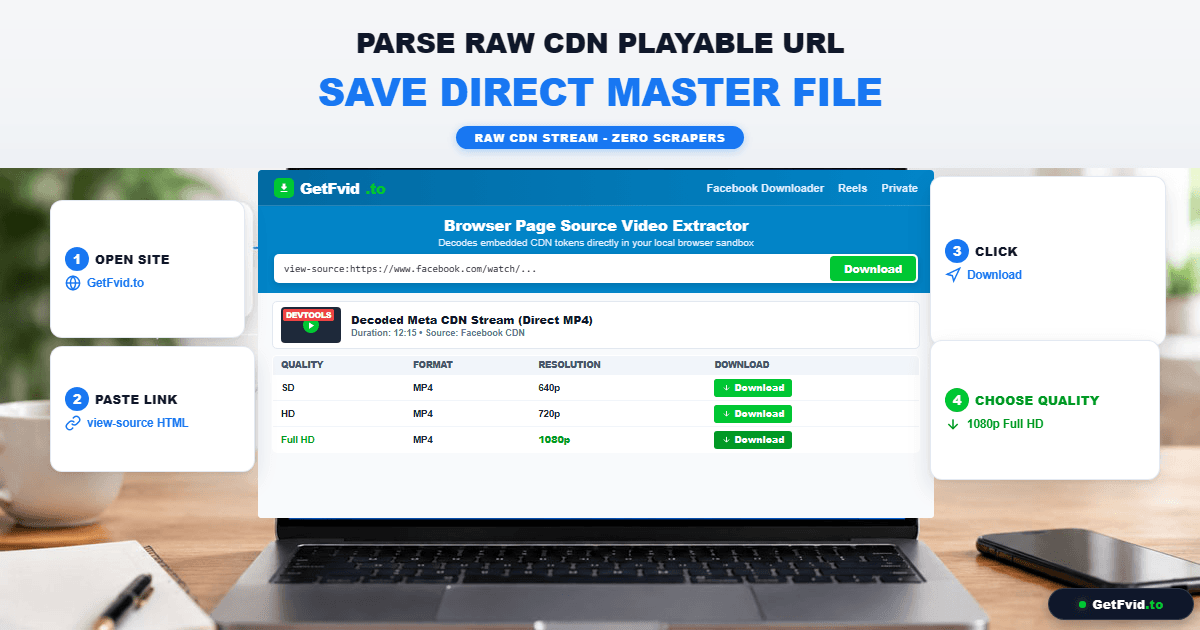
Step 1: Access the Authenticated Post
Log into Facebook and open the private group video. Confirm that your user account has viewing clearance.
Step 2: Extract the Raw DOM Buffer
- On Windows, press
Ctrl + U. - On Mac, press
Cmd + Option + U. - Press
Ctrl + Ato select the complete document buffer, andCtrl + Cto copy.
Step 3: Run the Local Regex Parser
Navigate to GetFvid Facebook Private Downloader, paste the clipboard buffer into the source input area, and click Download.
Step 4: Stream Ingestion & DASH Remuxing
GetFvid isolates the playable_url_quality_hd string, performs client-side URL sanitization, and initiates a direct binary stream fetch to save your Full HD MP4 file. (For technical details on how we ensure synchronized audio on high-bitrate streams, review our DASH Muxing Architecture Guide).
Why Sandboxed Web Tools Trump Browser Extensions
Many users ask: "Why shouldn't I just install a Chrome extension that clicks a button for me?"
From a cybersecurity auditing perspective, third-party browser extensions represent one of the single greatest vectors for consumer malware:
| Security Parameter | Sandboxed Web Tool (GetFvid) | Third-Party Browser Extension |
|---|---|---|
| System Permissions Required | Zero (Runs in standard tab) | High ("Read and change all data on all websites") |
| Code Auditing Transparency | Inspectable in Browser DevTools | Packaged background scripts can auto-update |
| Silent Ownership Transfers | Impossible | Frequent (Devs sell popular extensions to ad networks) |
| Session Cookie Access | Strictly Prohibited by browser CORS | Full Read/Write Access to active sessions |
| Risk of Malicious Ad Injection | Zero | Extremely High |
For a deeper dive into extension vulnerabilities, read our full investigation: Is It Safe to Download Facebook Videos? Security Risks of Extensions vs Web Tools.
Compliance, Privacy & Data Protection (GDPR / CCPA)
Because GetFvid’s private downloader operates on a stateless client-side execution model:
- Zero Personal Identifiable Information (PII): We do not log IP addresses, Facebook user IDs (
c_user), or account metadata. - No Server Storage: Media files travel directly from Meta’s edge CDN nodes to your personal device. GetFvid does not maintain proxy caches or intermediate storage servers for private downloads.
- GDPR & CCPA Compliant by Design: Privacy is not merely a policy at GetFvid; it is an architectural reality enforced by cryptography and browser sandboxing.
How to Audit and Verify Client-Side Execution in Real Time
For software engineers, cybersecurity researchers, and privacy-conscious users, you do not need to take our word on trust alone. You can independently verify that our code runs 100% client-side using standard browser Developer Tools:
- Open GetFvid Facebook Private Downloader in Chrome, Firefox, or Edge.
- Press
F12(or right-click and select Inspect) and navigate to the Network tab. - Filter the network requests by Fetch/XHR.
- Paste your private Facebook HTML source code into GetFvid and click Download.
- Observe the Network Activity monitor:
- You will notice that zero payload packets containing your pasted HTML are sent to any external server.
- The only outbound HTTP
GETrequest generated by your browser connects directly tohttps://video.xx.fbcdn.net/...to retrieve the binary video chunks. - This provides irrefutable mathematical and architectural proof that the regex DOM parsing executes entirely within your local machine's memory, ensuring complete confidentiality.
Frequently Asked Questions (FAQ)
Can GetFvid see my Facebook password when I paste the page source?
No. Your Facebook password is never stored in the webpage HTML source code. When you log into Facebook, your browser exchanges your credentials for an encrypted session cookie. The page source contains only layout code, post text, and temporary CDN media URLs.
Why do some private video source codes show "playable_url: null"?
If playable_url is null, it typically means one of three things:
- The video is still actively broadcasting (see our guide on Downloading Facebook Livestream Replays).
- The video is currently processing in Meta’s transcoding queue.
- The video was removed by the author or restricted by age/location settings (see our Facebook Video Unavailable Fix Guide).
Does client-side page source extraction work on mobile devices?
Yes! You can prefix any private post link with view-source: in mobile Chrome, or request the desktop site in Safari. However, performing this on a desktop PC or Mac is substantially faster due to the large volume of text copied.
How long do the extracted video CDN tokens remain valid?
Facebook’s signed CDN query parameters generally remain active for 2 to 6 hours from the moment the page source is generated. Once this window lapses, the token expires, returning an HTTP 403 Forbidden. If a download stalls, simply refresh the Facebook post and copy a fresh source code buffer.
Is it legal to extract private group videos using page source parsing?
Extracting private video content you have authorized access to for personal archiving, educational study, or fair use research is fully permissible. However, sharing, distributing, or monetizing private group intellectual property without the copyright holder's authorization violates digital copyright laws. Review our legal primer: Copyright, Fair Use & Legal Rules for Downloading Facebook Videos.
Download Facebook Videos in High Quality Now
Paste your Facebook video link into GetFvid to download to your device in 1080p Full HD, 100% free.