



























How to Download Facebook Reels in 1080p Without Watermark (iPhone, Android & PC)
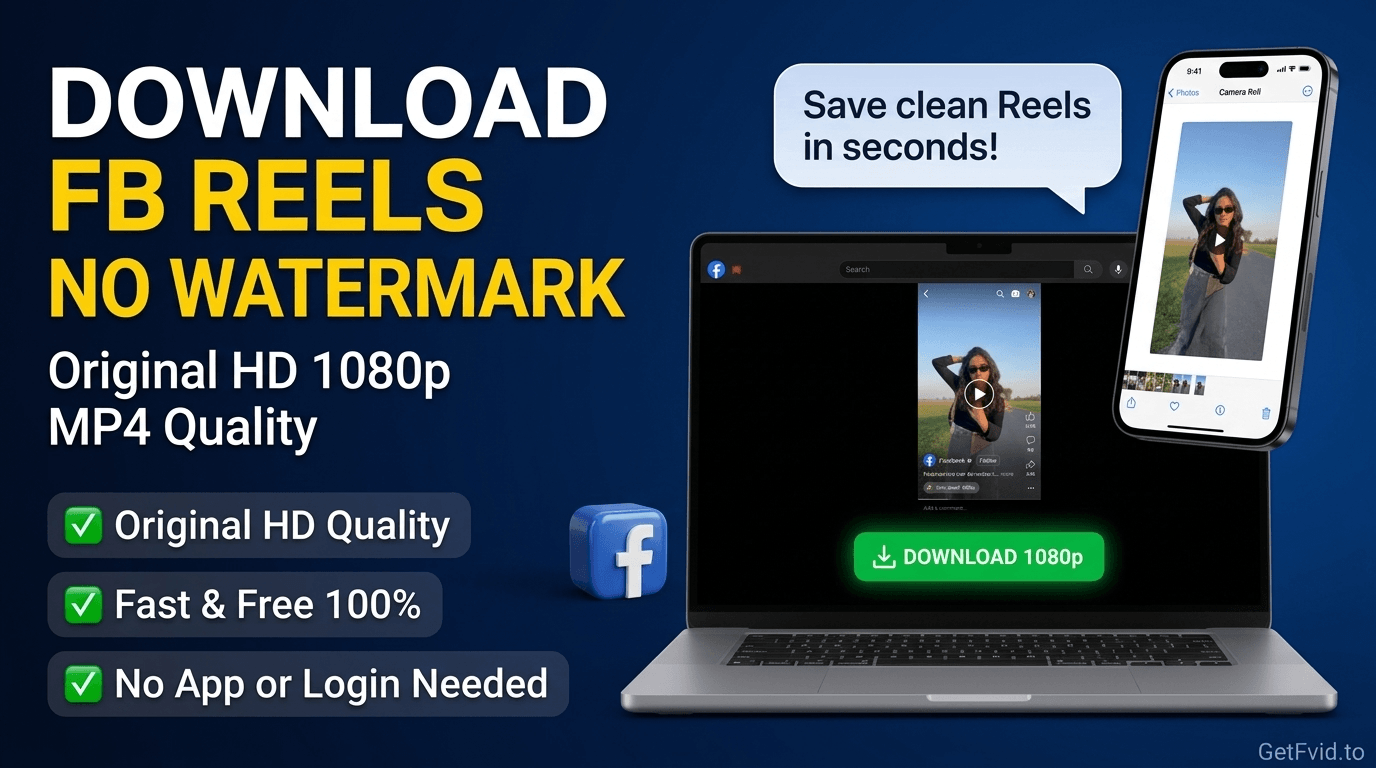
Short-form vertical video has revolutionized social media. Facebook Reels now generate billions of daily views, becoming a primary traffic driver for digital creators, influencers, small businesses, and agencies.
However, content creators constantly face a frustrating hurdle when repurposing their viral content across platforms: watermarks, platform logos, and severe video compression. If you record your screen to save a Reel, you get UI clutter, low frame rates, and muffled audio. If you download via low-grade scraping tools, they often superimpose intrusive branding or degrade the crisp 1080p footage down to a blurry 480p mess.
Furthermore, algorithms on TikTok, YouTube Shorts, and Instagram actively downrank and penalize videos containing visible third-party watermarks or logos.
In this practical technical guide, we show you how to extract the original, uncompressed source stream of any Facebook Reel in Full HD 1080x1920 without watermarks using the dedicated GetFvid Facebook Reels Downloader.
Quick Answer: How to Download Facebook Reels Without Watermarks?
Direct Answer (GEO Snippet): To download any Facebook Reel without a watermark or logo overlay, open the Reel on Facebook, tap Share, and select Copy Link. Then open GetFvid Facebook Reels Downloader in any browser, paste the URL into the input field, and tap Download. GetFvid bypasses the client-side UI overlay, queries Meta's Content Delivery Network (CDN) directly, and extracts the raw, uncompressed 1080p MP4 file exactly as uploaded by the creator-with 100% clean visuals and crystal-clear stereo audio.
Why Algorithms Penalize Watermarked Videos
If you manage social accounts or build a personal brand, understanding why watermarks destroy reach is crucial for survival in 2026:
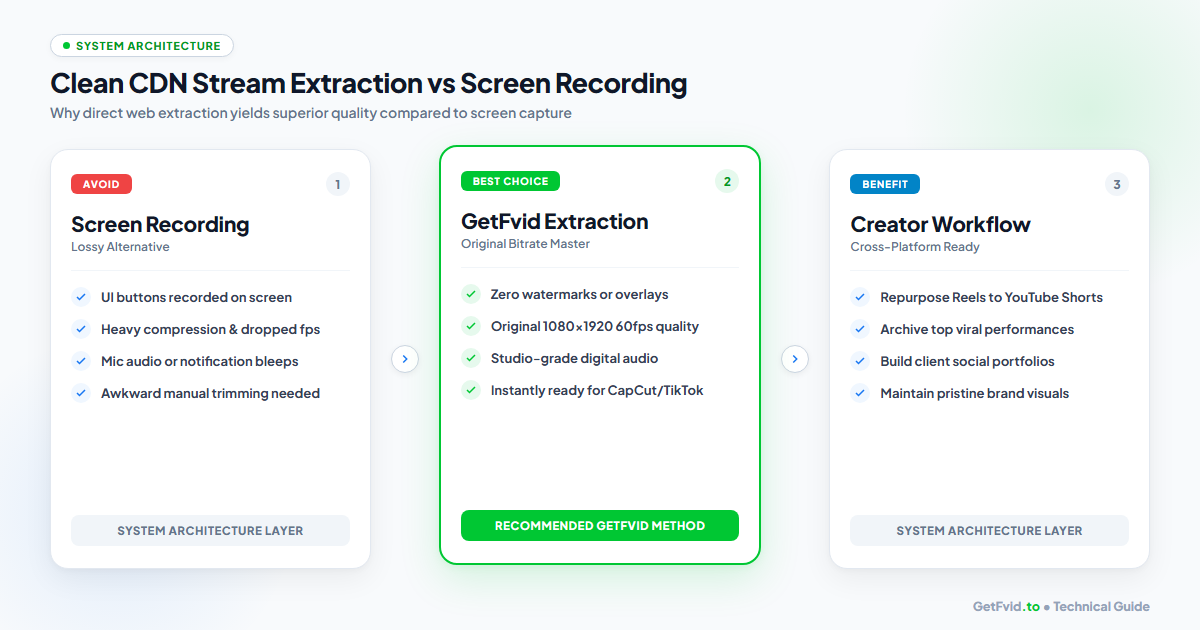
- Algorithmic Downranking: TikTok, Instagram, and YouTube have publicly confirmed that their recommendation engines automatically detect bouncing logos, platform watermarks, and UI elements. Posts containing these visual artifacts are categorized as recycled low-effort reposts and stripped from the For You Page (FYP) or Explore tabs.
- Perceptual Compression Degradation: When a video is screen-recorded, it undergoes double-compression: first during display rendering on your phone screen, and again when re-encoded by your recording software. This results in macroblocking, washed-out color saturation, and audio desynchronization.
- Professional Aesthetic: Brand partners, sponsors, and marketing agencies demand pristine, watermark-free raw assets for portfolio showcases and paid ad creatives.
By extracting the clean master MP4 directly from Meta's edge servers via GetFvid, you retain 100% of the original visual bitrate without any artifacts.
Step-by-Step Guide: Downloading Facebook Reels in 1080p Without Watermarks
Here is the exact, universal step-by-step workflow for all operating systems (iOS, Android, Windows, Mac, and ChromeOS).
Step 1: Copy the Facebook Reel Link
Locate the vertical Reel you want to save.
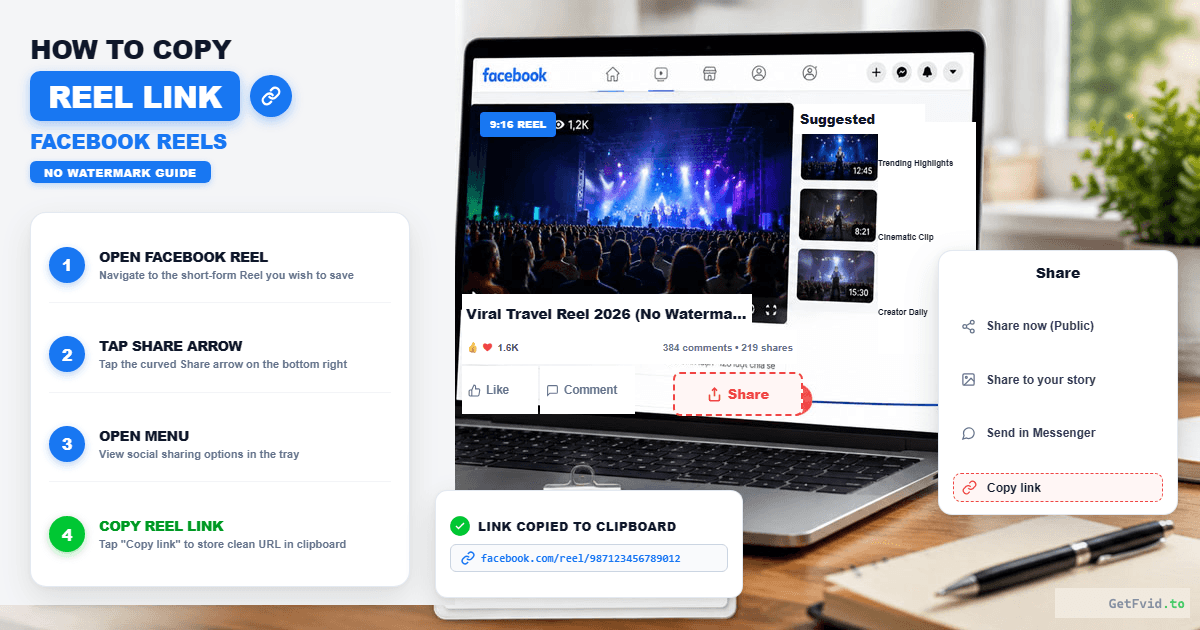
In the Facebook Mobile App (iOS / Android)
- Open the Facebook app and tap into the Reels viewer.
- Look at the vertical action bar on the right side of the screen.
- Tap the Share icon (the curved arrow).
- On the sharing sheet that pops up from the bottom, tap Copy Link.
- Alternative: Tap the three dots (
...) located at the bottom-right corner and tap Copy link.
- Alternative: Tap the three dots (
In Desktop Browsers (Windows / Mac)
- While scrolling your Facebook feed or Watch section, click on the Reel to expand it.
- The URL in your address bar will read:
https://www.facebook.com/reel/123456789012345/ - Highlight and copy the URL (
Ctrl + Con Windows orCmd + Con Mac).
Step 2: Paste into the GetFvid Reels Downloader
Open your favorite browser (Safari, Chrome, Edge, Firefox, or Brave) and navigate to the dedicated Facebook Reels Downloader.
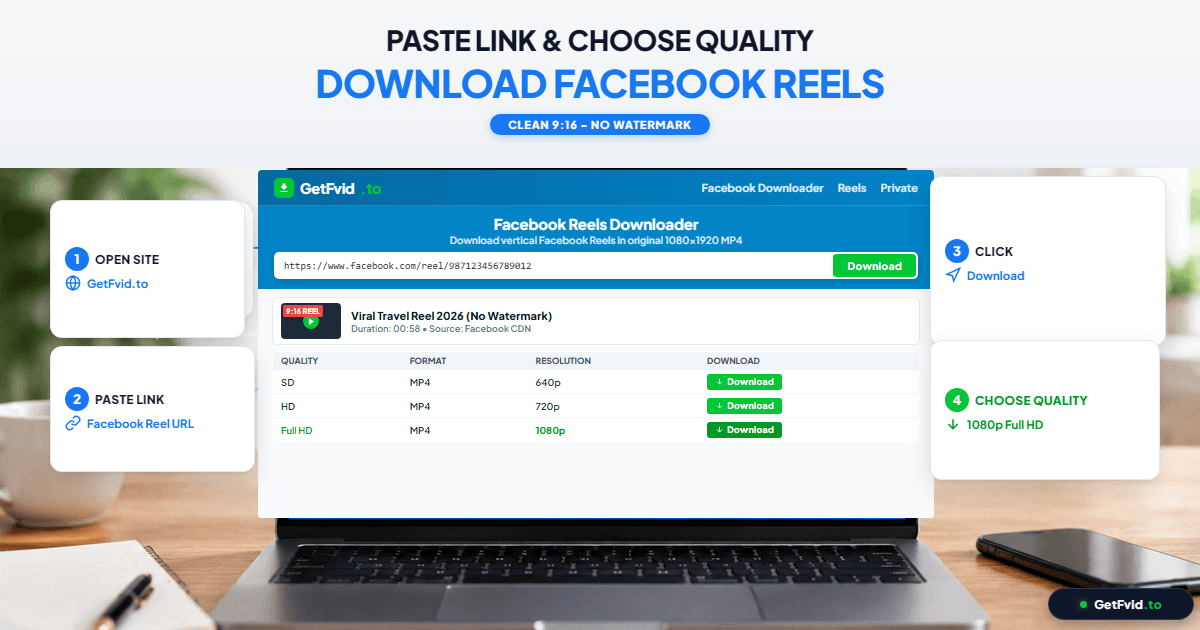
- Paste the copied Reel URL into the input field.
- Click or tap the green Download button.
- In under 2 seconds, GetFvid’s media parser contacts Meta’s content delivery servers, retrieves the authenticated CDN manifest, and separates the raw streams.
Step 3: Choose 1080p Full HD & Save Clean MP4
A list of available stream options will appear on your screen:
- 1080p (Full HD - Merged Audio): The highest possible resolution (1080x1920 pixels) with synchronized stereo AAC audio. This file has zero watermarks, zero borders, and zero logos.
- 720p (HD): High quality with a slightly lower file size (ideal if your phone has limited free memory).
- Render MP3: Audio-only extraction. Perfect for grabbing background music, trending voiceovers, or speeches. Learn more in our How to Extract Audio & MP3 from Facebook Guide.
Tap the green Download button next to the 1080p option. The file will save directly to your device storage.
Device-Specific Instructions for Mobile Creators
How to Save Facebook Reels to iPhone Camera Roll
If you are on an iPhone or iPad, saving downloaded files directly into your native Photos app requires just two quick taps in Safari:
- Open Safari and use GetFvid Facebook Reels Downloader.
- When the download finishes, tap the blue downward arrow in the Safari address bar.
- Tap the downloaded
.mp4file to open the native iOS preview player. - Tap the Share button in the bottom-left corner and select Save Video.
- The clean, unwatermarked Reel is now sitting in your Camera Roll / Photos, ready for editing in CapCut, InShot, or Premiere Rush!
- For an illustrated, in-depth walkthrough of this iOS feature, read our guide on How to Save Facebook Reels to iPhone Camera Roll.
How to Download Reels on Android Devices
On Android smartphones (Samsung Galaxy, Google Pixel, Xiaomi, OnePlus):
- Use Google Chrome or Samsung Internet to visit GetFvid.
- Paste the link and tap Download.
- The video downloads directly into your device's
/Download/folder. - Open Google Photos or your native Gallery app; the video appears immediately under "Recent Downloads" with zero watermarks.
Technical Specifications: Facebook Reels Video Standards
To maintain peak visual quality across all platforms, ensure your downloaded and re-uploaded videos adhere to these 2026 industry specs:
| Specification | Optimal Standard | Technical Details |
|---|---|---|
| Pixel Dimensions | 1080 x 1920 pixels | True 9:16 vertical aspect ratio |
| Frame Rate (fps) | 30 fps or 60 fps | 60fps recommended for high-motion content |
| Video Codec | H.264 (AVC) / High Profile | Maximum compatibility across all editing apps |
| Video Bitrate | 4,500 - 7,500 kbps | Crisp detail without heavy blockiness |
| Audio Format | AAC Stereo (48 kHz) | 128 - 256 kbps bitrate |
| Container | MP4 (.mp4) | Universal container supported on iOS and Android |
| Maximum Duration | Up to 90 seconds | Varies depending on account eligibility |
To see how Facebook Reels compares to TikTok and Instagram Reels across aspect ratios and algorithm restrictions, check out our comprehensive comparison: Facebook Reels vs TikTok vs Instagram Reels Specs.
Creator Playbook: How to Safely Repurpose Facebook Reels
Repurposing your viral Facebook Reels to TikTok, YouTube Shorts, and Instagram can double or triple your overall audience reach without doubling your filming time. Follow this four-step creator playbook:
[1. Upload Master Reel to Facebook]
               │
               ▼
[2. Download Clean 1080p MP4 via GetFvid]
   (Zero Watermarks, Pristine Audio)
               │
               ▼
[3. Open in Video Editor (CapCut / Premiere)]
   (Check Safe Zones & Re-time Captions)
               │
               ▼
[4. Cross-Post to TikTok, Shorts & IG]
   (Maximum Algorithmic Distribution)
- Download the Clean Master File: Always use GetFvid to retrieve the clean, non-watermarked MP4 file rather than screen-recording.
- Inspect the Safe Zones: Keep crucial visual elements, branding, and text captions inside the center 1080x1350 pixel safe zone. This prevents TikTok’s right-hand action buttons (Like, Comment, Share) and bottom caption overlays from obscuring your video content.
- Use Native Platform Audio When Possible: If your Reel uses trending commercial music, consider re-attaching the official trending sound on TikTok or Instagram before publishing. This guarantees you ride each platform's native audio recommendation algorithms.
- Batch Download Multi-Reel Campaigns: If you need to back up an entire month of Reels for your brand, use our Facebook Bulk Downloader to process up to 10 URLs in parallel and bundle them into a single high-speed ZIP archive. Check our guide: How to Bulk Download Multiple Facebook Videos & Reels.
Frequently Asked Questions (FAQ)
Does GetFvid add any watermark or logo to the downloaded Reel?
No. GetFvid is 100% clean and watermark-free. We do not insert logos, text overlays, ending sponsor frames, or watermarks into your files. You receive the exact original MP4 stream hosted on Meta's CDN servers.
Can I download Facebook Reels with the original sound?
Yes! Our tool automatically remuxes the isolated DASH video stream with the synchronized AAC audio track into a single MP4 file. You get crystal-clear stereo sound that matches the visuals frame-for-frame.
Can I download Reels from a Private Facebook Group?
If a Reel is posted inside a Closed or Secret Group, standard public downloaders cannot access it. However, you can use our Facebook Private Video Downloader to extract private group videos using secure, client-side page source parsing without sharing your password.
Why do some Reels download in 720p instead of 1080p?
If the creator originally recorded or exported their video in 720p, Facebook will not upscale it to 1080p. GetFvid always presents the highest resolution that Meta's edge servers have encoded for that specific Reel.
Is it legal to download Facebook Reels without watermark?
Downloading videos for personal offline viewing, research, or repurposing your own creative work is completely legal under Fair Use. However, re-uploading other creators' intellectual property without their authorization violates copyright laws. Read our detailed legal guide: Copyright, Fair Use & Legal Rules for Downloading Facebook Videos.
Download Facebook Videos in High Quality Now
Paste your Facebook video link into GetFvid to download to your device in 1080p Full HD, 100% free.