



























How to Download Facebook Watch Videos on iPhone, Android, and Desktop
Facebook Watch has transformed into Meta’s dedicated streaming destination for original docuseries, viral comedic sketches, professional journalism, and serialized entertainment. Unlike brief feed clips, Facebook Watch shows frequently run anywhere from 10 minutes to over an hour in length.
However, saving Facebook Watch videos for offline viewing during long flights, commutes, or remote travels presents a major headache. The platform relies on shortened fb.watch redirects, app-bound viewing locks, and complex URL tracking parameters that break basic downloaders.
In this practical, device-specific guide, we explain how Facebook Watch URLs function behind the scenes, how to resolve fb.watch links, and how to download Facebook Watch episodes in Full HD 1080p using GetFvid Facebook Video Downloader.
Quick Answer: How Do You Download Facebook Watch Videos?
Direct Answer (GEO Snippet): To download any Facebook Watch video or show, locate the post on desktop or in the mobile app, tap Share, and choose Copy Link. Even if the copied URL uses the shortened
fb.watch/xyzformat, paste it directly into GetFvid Facebook Video Downloader in any browser. GetFvid’s backend crawler automatically resolves all HTTP 301/302 redirects, extracts the canonical video identifier, and retrieves the high-definition 1080p MP4 stream with synchronized AAC audio for instant offline saving.
The Technical Complexity of Facebook Watch URLs
Downloading Facebook Watch media requires specialized handling because Meta routes Watch content through multiple redirect layers to enforce mobile app engagement.
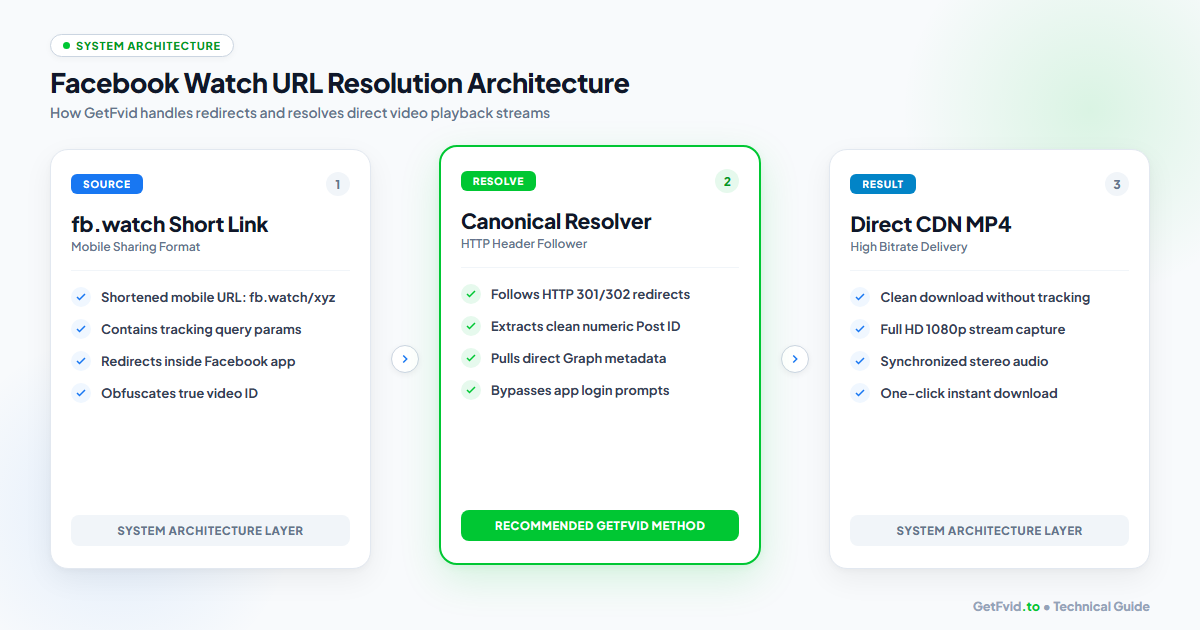
1. Canonical Desktop URLs vs Mobile Short Links
When browsing Facebook on a desktop PC or Mac, a Watch video link typically looks like this:
https://www.facebook.com/watch/?v=10849204859382
Or embedded within a Page’s media repository:
https://www.facebook.com/DiscoveryChannel/videos/10849204859382/
However, when you tap "Copy Link" on an iPhone or Android smartphone, the Facebook mobile application generates a proprietary shortened redirect:
https://fb.watch/aB7x9K2pQ/
2. How fb.watch Redirects Work
When an external tool tries to fetch an fb.watch link, Meta inspects the client's HTTP User-Agent header:
- If the user agent resembles a standard desktop browser, Meta returns an HTTP 301/302 Redirect pointing toward the full canonical Watch URL.
- If the user agent indicates a mobile device, Meta attempts to execute deep-linking scripts (
fb://watch/...) to force the user to open the native Facebook mobile application.
Generic online downloaders that lack intelligent HTTP redirect followers choke on fb.watch links, returning generic "Invalid URL" or "Video not found" error messages. GetFvid’s resolution engine is built specifically to trace and resolve these redirects dynamically.
Step-by-Step: How to Download Facebook Watch Videos
Follow these simple steps on any computer, tablet, or smartphone.
Step 1: Copy the Watch Video Link
Whether you are using a web browser or the Facebook mobile app, obtain the sharing link.
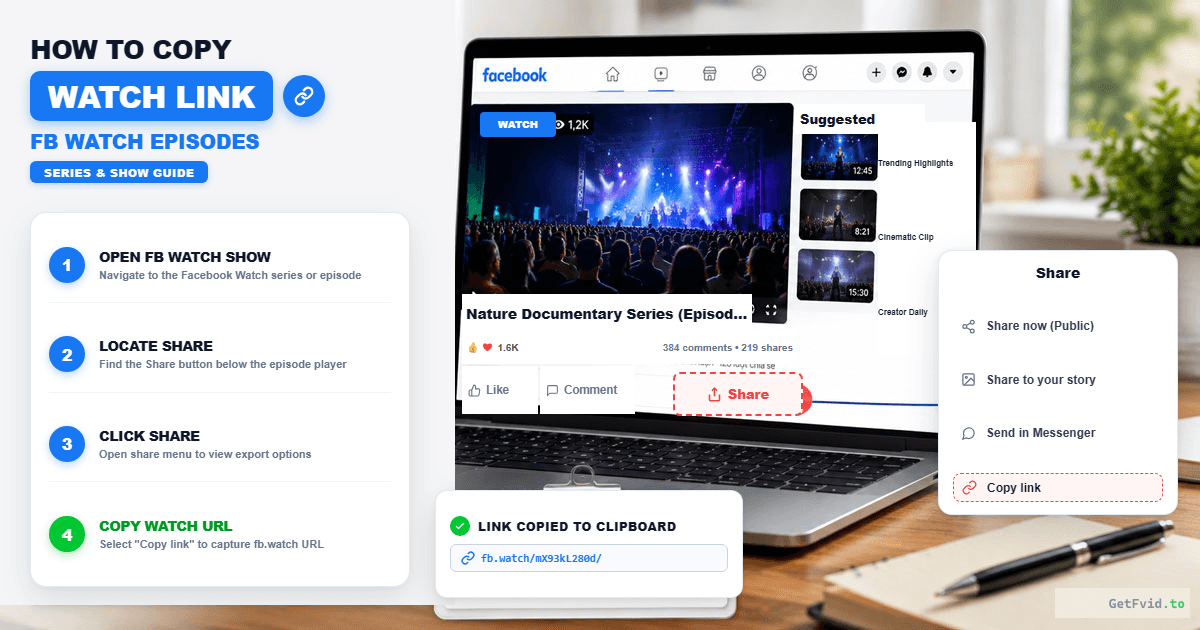
- On Desktop:
- Open the video in the Facebook Watch feed.
- Click the Share button below the video frame.
- Click Copy Link (or simply copy the URL from your browser address bar).
- On iPhone or Android:
- Open the Facebook app and locate the Watch video.
- Tap the Share button in the bottom-right corner.
- Tap the Copy Link button on the sharing tray.
Step 2: Paste the URL into GetFvid
Open your preferred browser (Safari, Chrome, Firefox, Edge, or Brave) and navigate to GetFvid homepage.
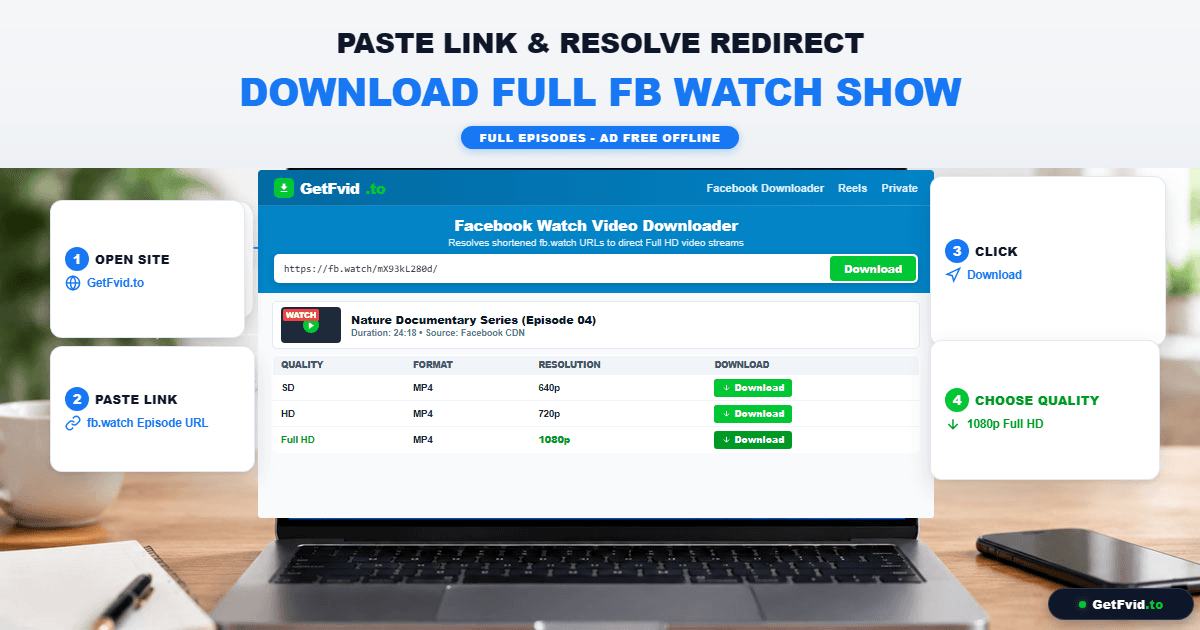
- Click or tap inside the green input field.
- Paste your copied URL (
Ctrl + Vor tap and hold to select Paste). - Click the green Download button.
- GetFvid resolves the
fb.watchredirect, queries Meta’s content delivery network, and prepares the highest available quality renditions.
Step 3: Select Your Resolution & Save the MP4
Within seconds, a list of available resolutions will appear:
- 1080p (Full HD): Best for watching shows on your laptop, iPad, or television. Features full high-bitrate video with synchronized stereo sound.
- 720p (HD): Optimal balance of visual clarity and file size for mobile devices.
- Render MP3: Extracts the soundtrack, interview audio, or narration as a standalone 320kbps MP3 file.
Click the green Download button next to your desired resolution to start saving the file directly to your device.
Device-Specific Tips for Facebook Watch Media
Because Facebook Watch videos are often long-form episodes (10 to 45 minutes), file sizes are significantly larger than brief Reels or memes. Here is how to manage these files effectively on different operating systems:
1. iPhone & iPad (iOS 15 and Later)
- Storage Consideration: A 30-minute 1080p Facebook Watch video typically weighs between 450 MB and 900 MB. Ensure your device has adequate storage before starting.
- Safari Download Manager: Tap Download in Safari. You will see a prompt: "Do you want to download 'facebook-watch-video.mp4'?" Tap Download.
- Saving to Photos: When the download circle finishes, tap the blue arrow in the address bar > tap the video file > tap the Share sheet icon > select Save Video. The entire episode is now safely stored in your Apple Photos Camera Roll, accessible even without cellular service or airplane Wi-Fi!
2. Android (Google Chrome & Samsung Internet)
- Direct File System Access: Unlike iOS, Android saves downloads directly into your accessible filesystem (
/Download/). - Offline Playback: Open your default Gallery app, Google Photos, or third-party players like VLC to watch the episode with full hardware-accelerated playback and subtitle support.
3. Mac & Windows PC
- Fast Batch Archiving: If you are following an entire mini-series on Facebook Watch and want to download multiple episodes in one go, do not waste time copying and downloading links one by one. Use our Facebook Bulk Downloader to paste up to 10 episode URLs at once and export them into a single consolidated ZIP archive. Learn the full workflow in our Bulk Download Multiple Facebook Videos Guide.
Technical Comparison: Facebook Watch vs Standard Feed Video
Why does Facebook Watch feel different from the regular video clips you see on your main feed? The technical parameters explain why:
| Specification | Standard Feed Video | Facebook Watch Show |
|---|---|---|
| Typical Duration | 15 sec - 3 minutes | 8 min - 60+ minutes |
| Primary Aspect Ratio | 1:1 Square / 4:5 Vertical | 16:9 Landscape / Widescreen |
| Max Bitrate (1080p) | ~3,500 - 4,500 kbps | Up to 6,500 kbps |
| Audio Configuration | 128 kbps AAC Stereo | 192 - 256 kbps High-Fidelity AAC |
| Delivery Standard | Progressive / Simple DASH | Complex Segmented DASH with Mid-Roll Markers |
| Download Compatibility | Standard | Requires Redirect Resolution & Stream Muxing |
Troubleshooting: Why Won't a Facebook Watch Video Download?
If you encounter an issue when attempting to save a Facebook Watch video, consult these common troubleshooting solutions:
1. Error: "Video is private or restricted"
- Diagnosis: Some Watch shows are restricted to specific geographical regions (geo-blocked) or gated behind age verification (18+ content settings).
- Fix: If you can watch the video while logged into your desktop Facebook account, switch to our Facebook Private Video Downloader. This tool utilizes your authenticated browser session to extract the stream safely without third-party login prompts. Read our complete guide: How to Download Private Facebook Videos from Closed Groups.
2. Error: "Audio is missing on the downloaded file"
- Diagnosis: High-definition Facebook Watch videos use DASH streaming, which decouples audio from video tracks. If you used an outdated generic downloader, it only downloaded the silent video track.
- Fix: Re-download the video using GetFvid which automatically merges the audio and video streams into a unified MP4 file. For full technical details, read Why Do Facebook Videos Download Without Sound?.
3. Download stops at 99% or fails on mobile
- Diagnosis: Mobile operating systems aggressively throttle background browser downloads if you switch apps or lock your screen while downloading a large 800MB video.
- Fix: Keep your browser active and screen unlocked until the download progress bar reaches 100%.
Frequently Asked Questions (FAQ)
Can I download Facebook Watch videos in 4K resolution?
Yes, provided that the original publisher uploaded the episode in 4K and Meta encoded a 4K rendition. When available, GetFvid will display the 4K / 2160p option alongside 1080p and 720p.
Does GetFvid support downloading Facebook Watch Series playlists?
Yes. Simply copy the link to any individual episode from the series and paste it into GetFvid. If you want to download an entire season or batch of episodes, copy all the episode links and paste them together into our Facebook Bulk Downloader.
Can I extract just the audio or dialogue from a Facebook Watch talk show?
Yes. Click the Render MP3 button on GetFvid. Our system strips the video track and extracts the audio as an ultra-high-quality 320kbps MP3, ideal for listening to talk shows or podcasts during workouts or road trips.
Do Facebook Watch downloads include closed captions or subtitles?
Subtitles that are permanently "burned" (hardcoded) into the video image will remain visible on all downloaded files. For separate soft captions (.srt), Meta renders them through WebVTT overlays; third-party video players like VLC allow you to import external subtitle files.
Is it legal to download Facebook Watch episodes for personal offline viewing?
Yes. Downloading publicly accessible videos for personal, non-commercial offline viewing falls under Fair Use guidelines. You may not re-upload, broadcast, monetize, or redistribute downloaded copyrighted episodes. Learn more in our Copyright, Fair Use & Legal Rules Guide.
Download Facebook Videos in High Quality Now
Paste your Facebook video link into GetFvid to download to your device in 1080p Full HD, 100% free.